 Nic Dunn, CEO, Charle Agency
Why Ecommerce Brands Need Creative Ways to Collect Feedback
Most online stores collect feedback the same way: a ten-question survey link emailed a week after delivery. Response rates are low, the shoppers who reply are rarely the ones who struggled, and the answers arrive too late to fix anything. Creative feedback methods solve this by fitting the question into the shopping journey instead of competing with it.
For an ecommerce brand there are really two questions worth answering. What stops visitors from buying? And what makes customers choose you over the next tab? Baymard Institute puts the average cart abandonment rate at 70.22%, so for most stores the first question is worth far more money than any brand satisfaction score. If you want the wider context, our guide on how to reduce cart abandonment covers the usual culprits.
Good customer feedback mixes two types of data. Quantitative feedback, such as ratings, NPS and CSAT scores, tells you how big a problem is. Qualitative feedback, such as open-text answers, interviews and session recordings, tells you why it exists. Across the 100+ Shopify stores Charle has built, the brands that improve fastest collect both and review them together.
Pick the Moment Before You Pick the Method
The best feedback ideas are timed, not clever. A shopper's opinion is sharpest at specific moments, and each one suits a different question.
- Browsing: did the product page answer their question?
- Cart and checkout: what is making them hesitate?
- Thank-you page: how did they find you and what nearly stopped them?
- After delivery: did the product and packaging match expectations?
- Support conversations: was the problem solved, and was it avoidable?
Ask one thing per moment. Two or three multiple-choice questions is the ceiling for an on-site pop-up, and if you do link to a longer survey, say how many minutes it takes. Short, well-timed questions beat long, comprehensive ones every time.
On-Site: Creative Ways to Ask While Shoppers Browse
1. A one-question thank-you page survey
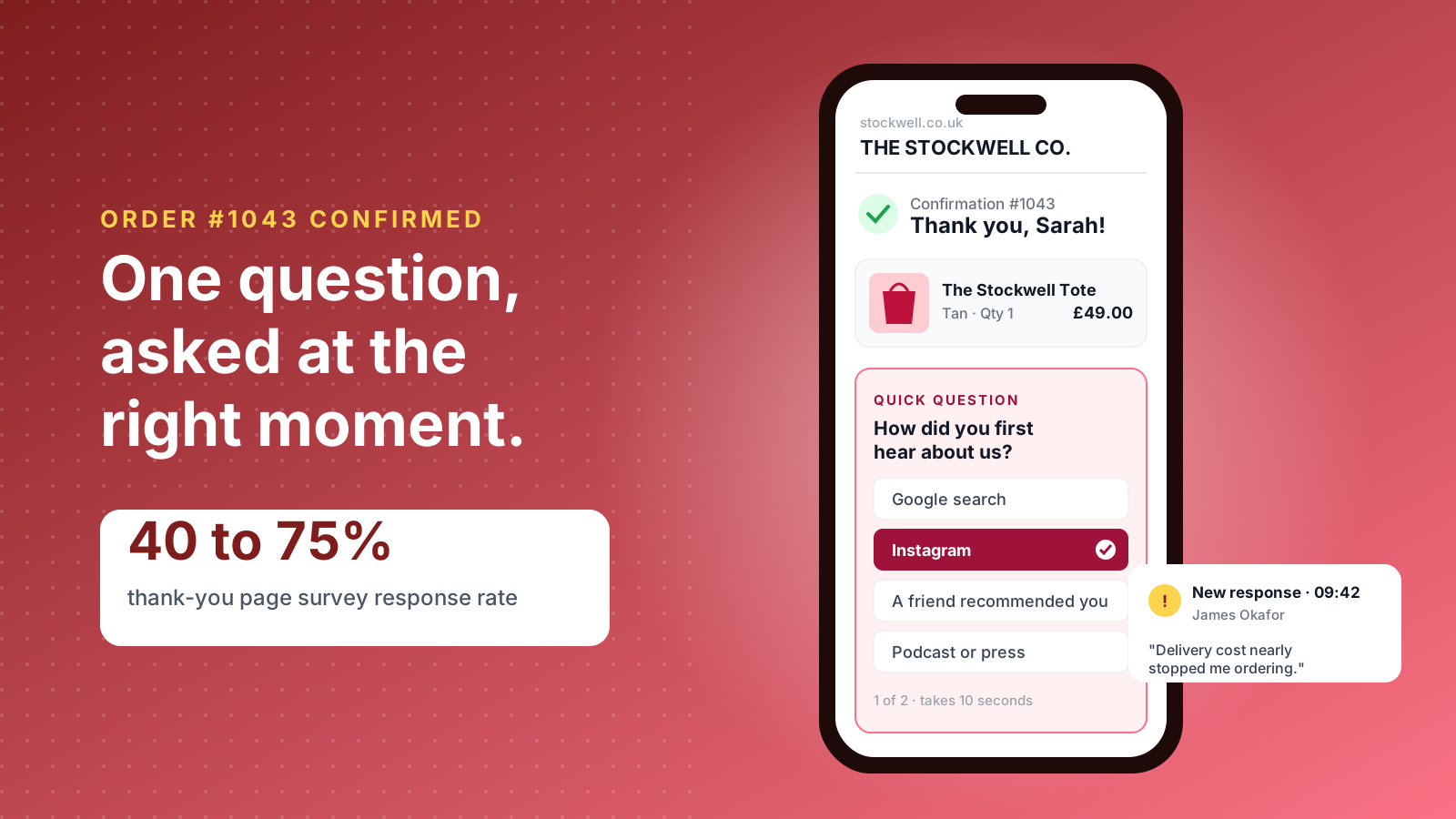
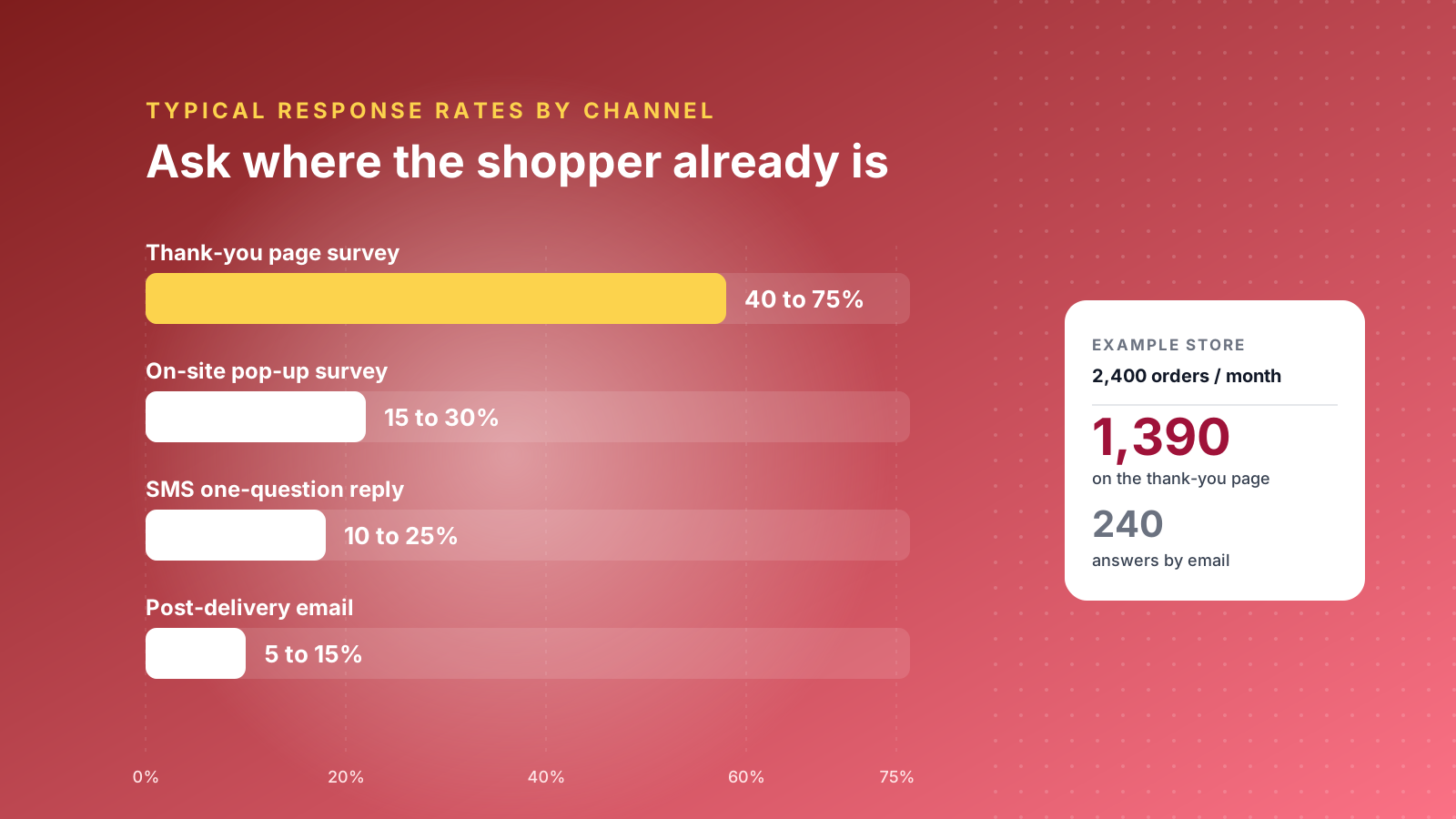
The order confirmation page is the highest-converting place to ask anything. Post-purchase survey apps report response rates of 40% to 75% on the Shopify thank-you page, compared with 5% to 15% for the same survey sent by email. Ask "How did you first hear about us?" for attribution, or "What nearly stopped you from ordering today?" for UX feedback. Since Shopify moved the Thank you and Order status pages to checkout extensibility, these surveys sit in app blocks you add through the checkout editor on any plan.
2. An exit survey on the cart
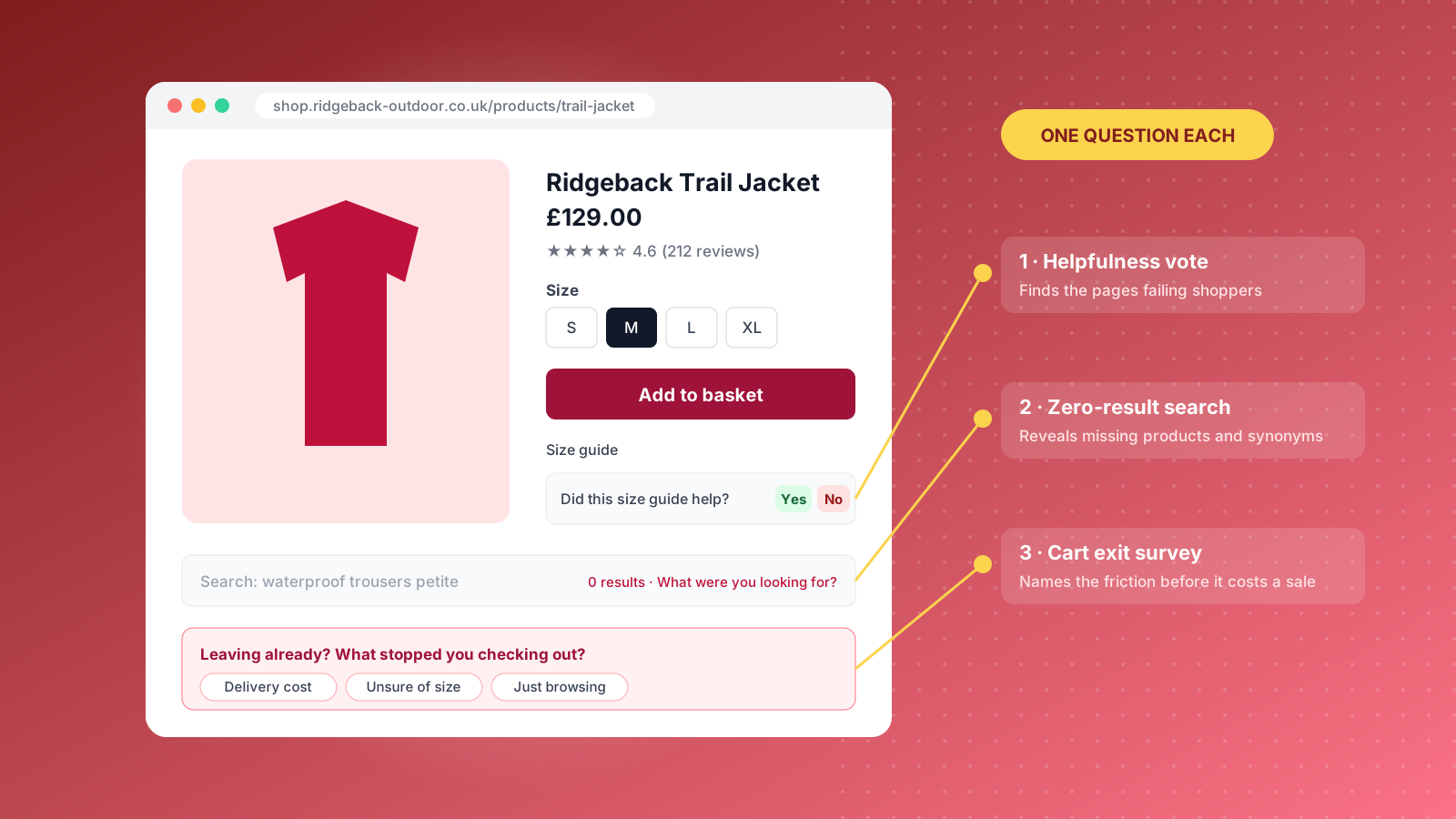
When a shopper with items in their basket moves to leave, show a small prompt: "Anything stopping you from checking out?" Offer four options, such as delivery cost, delivery time, unsure about size and just browsing, plus an "other" text box. These answers point straight at fixable friction.
3. A "Did this answer your question?" vote
Add a thumbs up or down to size guides, delivery pages and FAQs. A thumbs down opens one text field asking what was missing. It is the cheapest way to find out which pages are failing shoppers, and the open-text replies often hand you new FAQ content word for word.
4. A prompt on zero-result searches
When site search returns nothing, ask "What were you looking for?" Shoppers who search convert well, so every empty results page is lost revenue. The answers reveal missing products, missing synonyms and naming that only makes sense to your team.
5. A product quiz that doubles as research
Quizzes such as Dr. Squatch's soap finder recommend products while collecting zero-party data about needs, skin types or budgets. Add one optional question at the end, like "What would make this easier?", and the quiz becomes a feedback tool with a built-in reason to answer.
Watch Instead of Asking
6. Session recordings and frustration signals
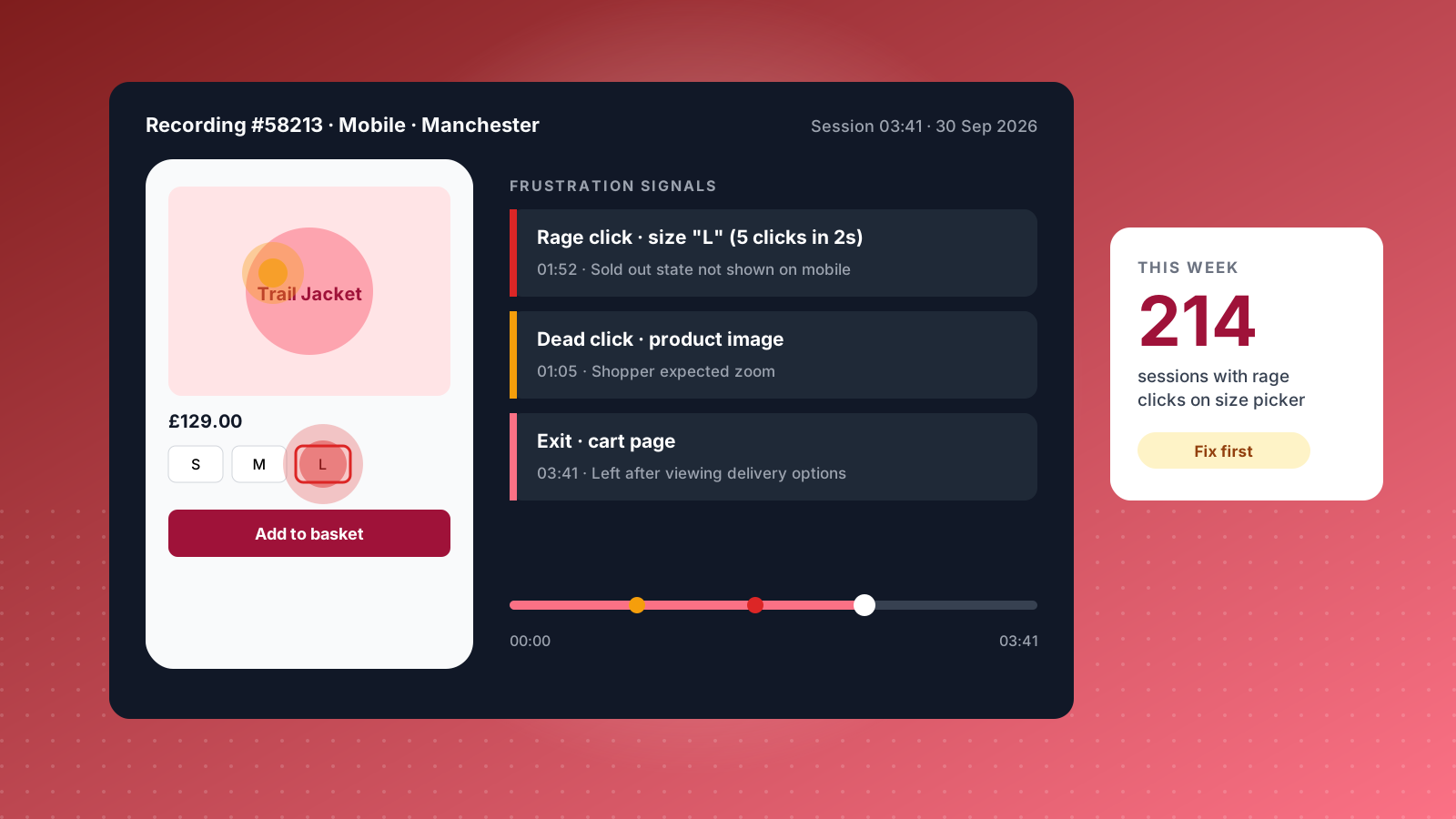
Microsoft Clarity is free, installs from the Shopify App Store and records sessions with heatmaps on every page. Filter recordings by rage clicks, where a visitor clicks the same element three or more times in quick succession, and dead clicks on things that look clickable but are not. Watching twenty frustrated sessions on a product page usually tells you more than a month of survey responses.
7. A five-shopper usability test
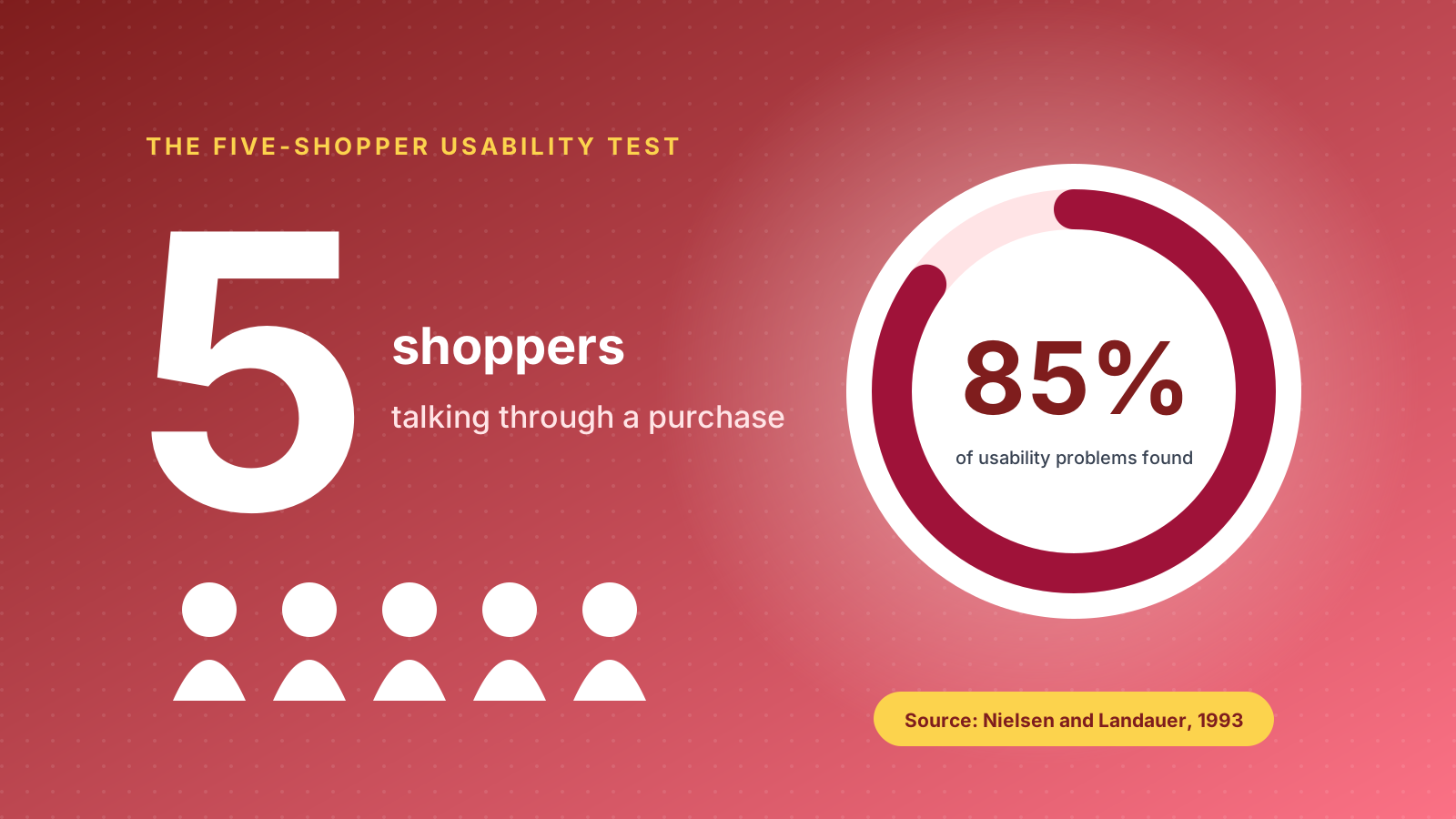
Jakob Nielsen's research found that testing with five users uncovers roughly 85% of usability problems. Recruit five people who match your customer, share a screen, and ask them to find and buy a specific product while talking through their thinking. You will hear the hesitation that analytics only hints at.
8. A/B tests as silent feedback
An A/B test is feedback without a question. Customers vote with their behaviour, and you learn which layout, copy or offer they prefer without interrupting anyone. Use survey and recording insights to form the hypothesis, then test it. Our guide to A/B split testing covers the process.
After the Order Arrives
9. A post-delivery email with the first question built in
Send it a day or two after the courier confirms delivery, and put the first question directly in the email as clickable stars or emojis. SurveyMonkey found that embedding the first question in the email lifted survey opens by 22%. One click records the answer and lands the customer on a short follow-up page.
10. Reviews with experience attributes
Review apps such as Okendo and Judge.me let customers rate separate attributes, like fit, quality and delivery speed. Add one for "ease of ordering" and every product review also becomes UX feedback. See our roundup of the best reviews apps for Shopify for the options.
11. A reply-to-text question
If customers have opted into SMS, a single message such as "How was your first order? Reply 1 to 5" gets fast, honest answers. Route any score of 3 or below to your support team so the customer hears back the same day.
12. Loyalty points for feedback
Award points for completing a survey, answering a profile question or joining a customer interview. It rewards effort rather than opinion, which keeps answers honest. Most Shopify loyalty apps support custom earning rules for this.
Social and Community Feedback
13. Instagram Story polls and sliders
Polls, quizzes and emoji sliders in Instagram Stories get quick reactions from customers and potential customers alike. Use them for low-stakes decisions such as which colourway to restock, or to test how easily people find things: "How quickly did you find your size on our site?"
14. A customer panel or founders' circle
Invite 20 to 50 of your best customers into a small group that previews new products and site changes. A private community, a monthly call or a simple ideas board where members vote on suggestions all work. Starbucks gathered thousands of customer ideas this way through My Starbucks Idea, and the same principle scales down to a single Shopify store.
15. Mining support tickets and return reasons
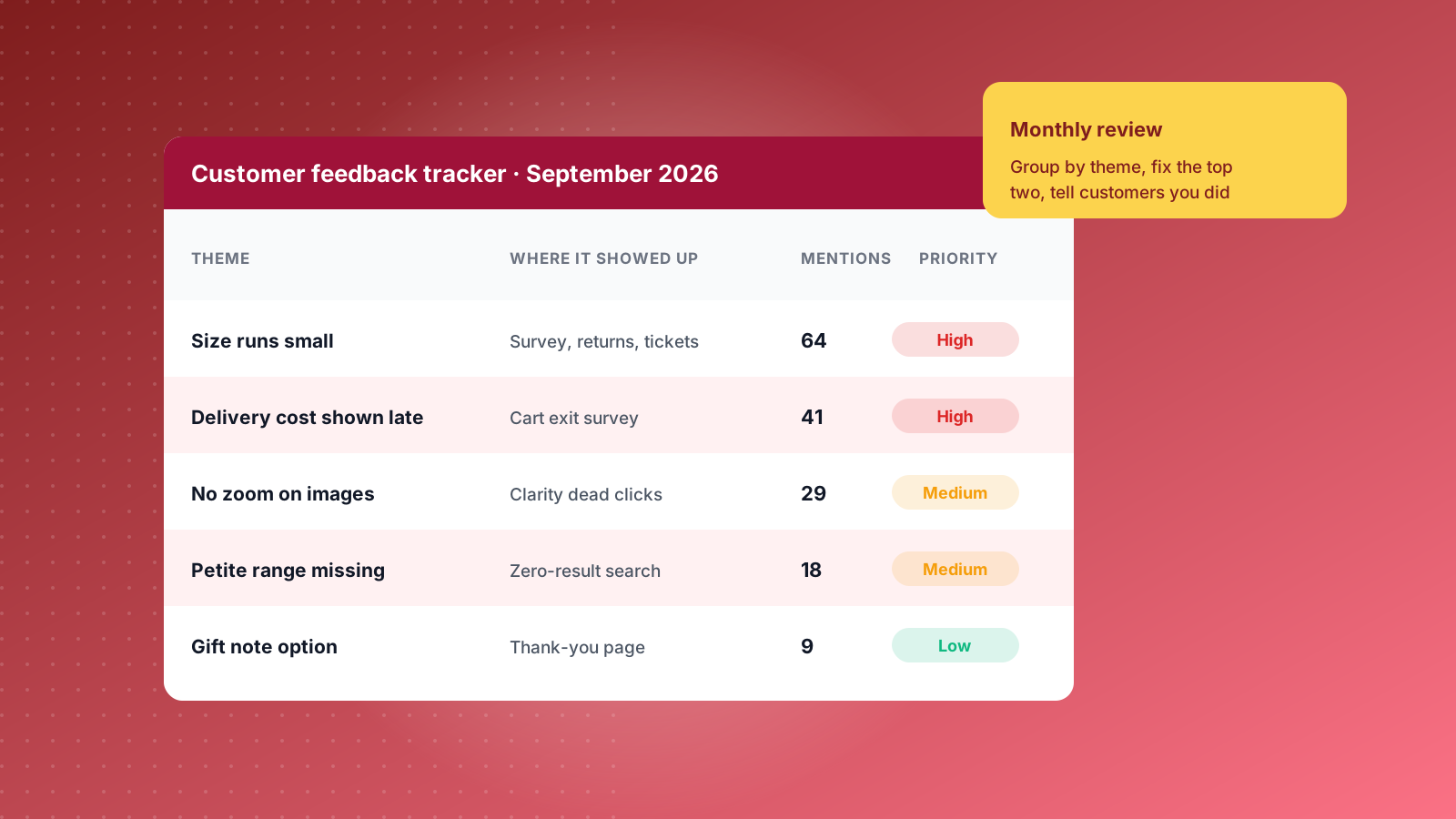
Your helpdesk already holds a library of unprompted feedback. Tag tickets in Gorgias or your helpdesk of choice by theme, such as sizing, delivery and checkout errors, and review the counts monthly. Return reasons captured in your returns app tell the same story. If "smaller than expected" tops the list, the fix is often a clearer size guide rather than a new product.
Feedback Questions to Ask at Each Touchpoint
Borrow these and adjust the wording to your brand voice. Each one is designed to produce an answer you can act on.
- Product page: "Is anything missing that would help you decide?"
- Cart: "What is stopping you from checking out today?"
- Thank-you page: "What nearly stopped you from ordering?" or "How did you hear about us?"
- After delivery: "Did your order arrive as you expected?" with a follow-up "What would you change?"
- After support: "Did we solve your problem?" as a CSAT score from 1 to 5.
- Periodic: "How likely are you to recommend us to a friend?" as an NPS score from 0 to 10.
Avoid leading questions such as "How much did you love our new checkout?" and avoid asking two things at once. Label rating scales clearly at both ends, and always leave room for an open-text answer because that is where the useful surprises live.
Incentives, Honesty and UK Review Rules
Incentives lift response rates, especially for longer surveys and interviews. A discount code, loyalty points or a prize draw entry all work. Make it clear you want honest answers, positive or negative, as part of a real effort to improve the shopping experience.
Reviews need more care than surveys. Since 6 April 2025, the Digital Markets, Competition and Consumers Act has banned fake reviews and concealed incentivised reviews in the UK, and the CMA can fine businesses up to 10% of global turnover. If you reward customers for leaving a review, disclose it clearly and never make the reward conditional on a positive rating. Private survey feedback that is never published is not a review, so the same rules do not apply, though UK GDPR still governs how you store and use the answers.
Turning Customer Feedback Into Store Improvements
Feedback only pays off when it changes the store. Build a simple loop and run it every month.
- Collect in one place: pipe survey answers, tagged tickets and review themes into one sheet or dashboard.
- Group by theme: count how often each issue appears across channels. A sizing complaint that shows up in surveys, tickets and returns is a priority.
- Find the insight behind the comment: "your hats are too small" might really mean your size labels are unclear.
- Prioritise: score each fix on revenue impact, confidence and effort, then start at the top.
- Test and close the loop: A/B test larger changes, then tell customers what you changed because of their feedback. People who see their input acted on reply again.
Treat this as a standing part of your conversion rate optimisation work, not a one-off project. The stores that keep asking keep improving.
Customer Feedback Tools for Shopify Stores
You do not need a large tech stack to start. Most Shopify brands can cover every method above with four or five tools.
- Microsoft Clarity: free heatmaps and session recordings with rage click and dead click filters.
- Hotjar: on-site surveys and feedback widgets, with a free plan covering 100 survey responses a month.
- KnoCommerce, Fairing or Zigpoll: post-purchase surveys on the thank-you page, built for attribution and customer research.
- Okendo or Judge.me: reviews with custom attributes and post-purchase review requests.
- Gorgias and Klaviyo: ticket tagging, CSAT surveys and automated feedback emails. Our Klaviyo flows guide shows where a feedback email fits.
Start with one on-site survey, one post-purchase survey and session recordings. That combination answers what is broken, why it is broken and how often it happens. If you would like help building a feedback programme into your Shopify store, talk to the Charle team.