 Nic Dunn, CEO, Charle Agency
What Ecommerce Replatforming Means
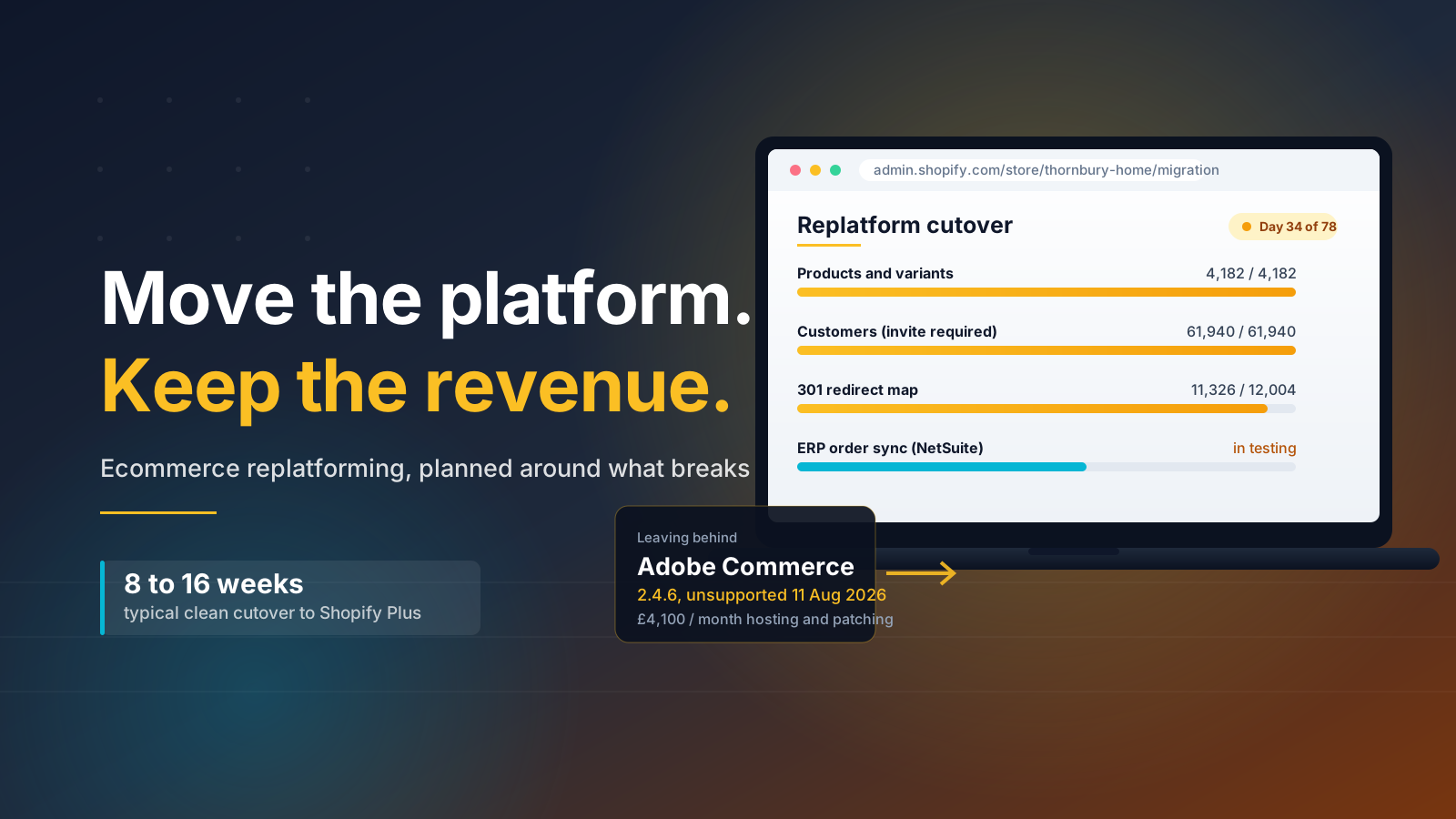
Ecommerce replatforming is the process of moving an online store from one ecommerce platform to another, including the catalogue, the customer records, the integrations and the front end that sits on top of them. It is a change of technology stack, not a redesign and not a server move.
The distinction matters commercially. A redesign changes the user experience shoppers see. Replatforming changes what the business can do: which payment methods you can offer, how quickly a merchandiser can launch a campaign, whether you can open a second market without a second build, how much of your engineering budget goes on keeping back office systems alive rather than shipping features.
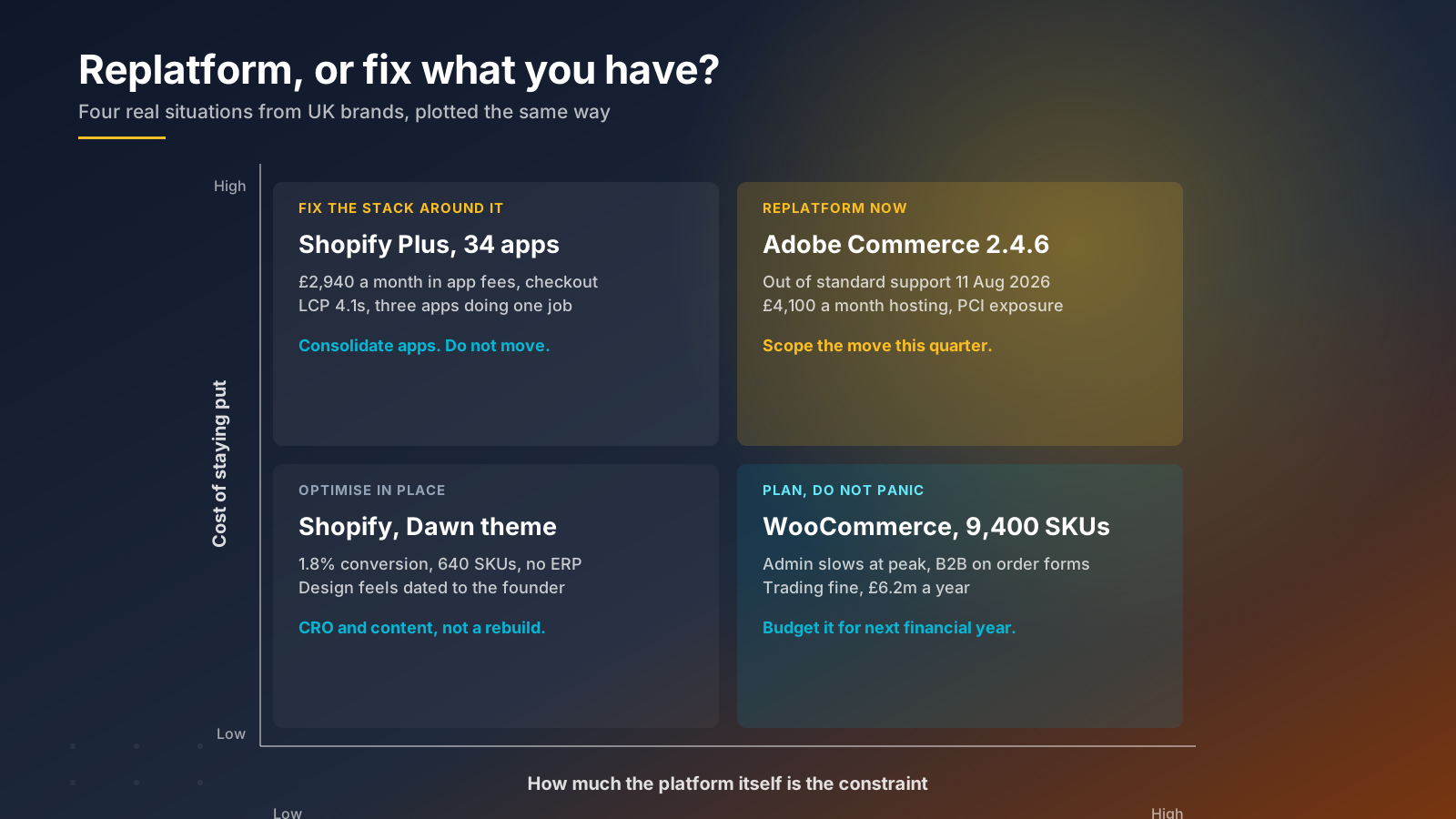
The decision usually arrives at a specific moment. Adobe ended standard support for Adobe Commerce 2.4.5 and 2.4.6 on 11 August 2026, which pushed a large group of UK businesses into either an upgrade or a platform change to keep their security patching and PCI compliance current. Others reach it more gradually, when the cost of maintaining the current ecommerce platform quietly overtakes the cost of replacing it.
Two numbers frame the market. Around 29% of retailers say they intend to switch commerce platforms within the year, and 90% of recent migrators report revenue improvements in performance and growth afterwards. The upside is real. So is the risk, which is why the rest of this guide is mostly about execution rather than platform features.
Replatforming vs Migration, Refactoring and Rehosting
These four terms get used interchangeably in sales conversations, and the confusion costs money because each one implies a different budget and a different risk profile.
- Replatforming: moving to a different commerce platform entirely, for example Adobe Commerce to Shopify Plus. New technology stack, new backend, new front end, full data migration and a new set of integrations.
- Migration: the data transfer itself. Products, customers, orders and content moving from one system to another. Migration is a workstream inside a replatforming process, not a synonym for it.
- Refactoring: rewriting parts of your existing codebase to improve performance or maintainability. Same platform, same systems, cleaner implementation.
- Rehosting: moving the same software to different infrastructure, such as on-premise servers to cloud hosting. Nothing about the application itself changes.
Rehosting a legacy ecommerce platform buys you better uptime and nothing else. If your problem is that merchandisers wait three weeks for a landing page, faster servers will not fix it. Equally, if your problem is slow mobile performance on a healthy platform, a full replatform is an expensive solution to a front end issue. We cover that trade-off in more depth in our guide to ecommerce platform migration versus optimisation.
Six Signs It Is Time to Replatform
No single signal justifies a replatforming project. Three or more together usually do, and most businesses recognise at least two of the six below before anyone says the word replatform out loud.
1. The platform is out of support. An unsupported ecommerce platform stops receiving security patches, which puts PCI DSS compliance at risk and makes your card processing a board-level problem rather than a technical one. Security exposure is the one sign on this list that carries a deadline attached to it.
2. Maintenance is eating the roadmap. When most of the development budget goes on patching, hosting and keeping integrations alive, the platform has become a cost centre. Legacy systems routinely absorb well over half of ecommerce IT spend before a single new feature ships, which is growth capital going nowhere.
3. Time to market has collapsed. If a new payment method takes two quarters, or a seasonal campaign needs a developer, the platform is limiting commercial agility. Merchandising teams should be able to work without a deployment.
4. Data sits in too many places. Businesses that grew by adding a separate ecommerce platform for each market or channel end up with customer, order and inventory management data spread across systems that do not agree with each other. Consolidating onto one commerce platform is often the real project.
5. Scalability and performance fail at the moments that matter. Slow admin at peak, cart and checkout timeouts on launch days, catalogue operations that take hours. Poor mobile performance that only appears under load is a platform problem, and scalability limits rarely announce themselves before a trading peak.
6. B2B and international are blocked. If you need company accounts, price lists, net payment terms or a second market and the current system cannot deliver it without custom development, you are paying to rebuild features that modern platforms include. Shopify made foundational B2B features available on every paid plan in April 2026, with unlimited catalogues, a dedicated B2B storefront and checkout extensibility reserved for Plus.
When Replatforming Is the Wrong Answer
Most articles on this topic are published by platform vendors, so the recommended solution is usually to move. Charle builds on Shopify, and we still talk businesses out of replatforming several times a year, because a platform change with no clear growth case attached is an expensive way to stand still.
The most common false positive is the tired site. Internal teams look at the storefront every day and see something dated. Loyal customers see something familiar. As the team at Onstate put it in their own writing on replatforming, a user experience that internal stakeholders call tired is often exactly what returning shoppers rely on, and rebuilding it wholesale is a recognised cause of the temporary conversion drop that follows many launches.
The second false positive is the app sprawl problem. A Shopify Plus store paying £2,940 a month across thirty four apps, with three of them doing overlapping jobs and a 4.1 second largest contentful paint on mobile, does not need a new platform. It needs app consolidation and a site performance pass. Our guide to speeding up a Shopify site usually recovers more revenue than a migration would, for a fraction of the cost, and it does not put your existing search performance at risk.
The third is the conversion problem. If the platform is stable and the catalogue is healthy but conversion sits below benchmark, that is a merchandising, content and cart experience problem. Replatforming does not fix it, and a rebuild resets whatever optimisation work you had already banked. Check your numbers against ecommerce conversion rate benchmarks before you reach for a platform change.
A useful test: write down the three business outcomes you expect from replatforming. If any of them could be achieved on your current platform within a quarter, do that first and re-run the decision in six months. Cheaper solutions deserve to be ruled out before the expensive one gets a budget, and a platform that is merely unloved is not the same as a platform that is holding back growth.
What It Costs and How Long It Takes
Published ranges are wide because they mix a 200 SKU direct to consumer store with a multi-market B2B operation, and because ecommerce platforms price very differently from one another. Here is how the numbers break down for UK brands in 2026.
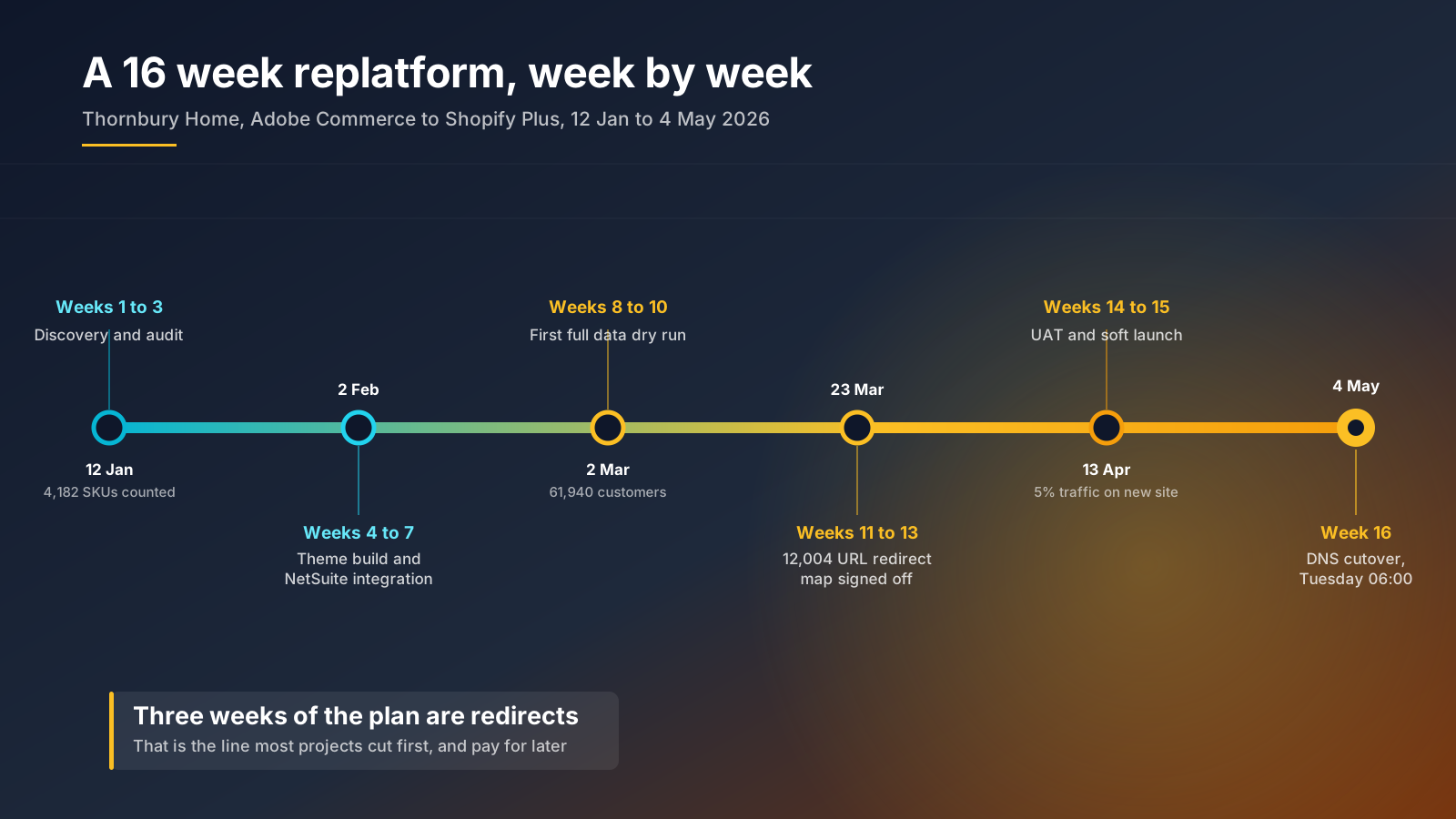
A clean Adobe Commerce or WooCommerce move to Shopify Plus typically lands between £30,000 and £120,000 and takes 8 to 16 weeks. Mid-market projects with ERP integration, B2B catalogues or multiple storefronts run 12 to 20 weeks, and enterprise programmes with several markets stretch to 16 to 24 weeks. Shopify Plus itself starts at around $2,300 per month on a three year term, which is a smaller share of the total than most finance teams expect.
The platform licence is usually only 20% to 40% of total cost. The rest is implementation: theme build, data migration, app and integration replacement, content, QA and project management. Budget for the fact that hidden costs, broken redirects chief among them, commonly add 40% to 60% to an initial quote.
Data migration deserves its own line. It is the single biggest source of overrun in the ecommerce replatforming process, with analysis of migration projects repeatedly pointing to data work as the workstream most likely to blow the budget. Most of the damage originates before launch, in scoping and preparation rather than in the build, which is why a discovery phase that properly interrogates business needs pays for itself.
Two practical rules from our own project experience. Scope the data migration before you sign anything, by counting the actual number of SKUs, variants, customers, orders and URLs rather than estimating them. And hold a contingency of at least 20%, explicitly, rather than discovering your team needs it in week eleven.
What Moves, What Breaks, What Gets Rebuilt
This is the section most replatforming guides skip, and it is the one that causes the arguments in week twelve. Assume nothing transfers until somebody has tested it, and treat customers and integrations as the two areas where a surprise costs the most.
Moves cleanly: products, variants, images, collections, inventory levels, customer names and addresses, blog content and static pages. These transfer with standard migration tooling given a clean source export.
Moves with caveats: historical orders import for analytics and customer service lookup, but they do not behave like native Shopify orders. You cannot refund or refulfil them through the standard flow. Customer lifetime value and order count fields do not come across in a customer CSV, so loyalty tiers built on them need recalculating.
Does not move at all: customer passwords. They are hashed irreversibly on the source platform and security requirements under PCI DSS make that deliberate, so every customer receives an account activation invite and sets a new password. Saved payment methods, stored cards, PayPal agreements and buy now pay later tokens stay behind for the same reason. Plan the communications for this before launch, not after the support tickets start.
Gets rebuilt: the theme, any custom apps, scripts, and every third party integration. Backend systems are the slow part here. An ERP, a warehouse management system, a CRM and a tax engine each need their connection rewritten against the new platform APIs, and each one needs testing against real order volume rather than a handful of sample transactions.
Subscriptions are their own project. Recharge and Bold both run migration programmes, and subscription records, payment methods and upcoming order schedules need to transfer together or you lose recurring revenue on the first billing cycle after cutover.
For the Shopify specific mechanics of each of these, our complete Shopify migration playbook walks through the sequence, and migrating Magento to Shopify covers the most common UK starting point.
Protecting Search Visibility Through the Move
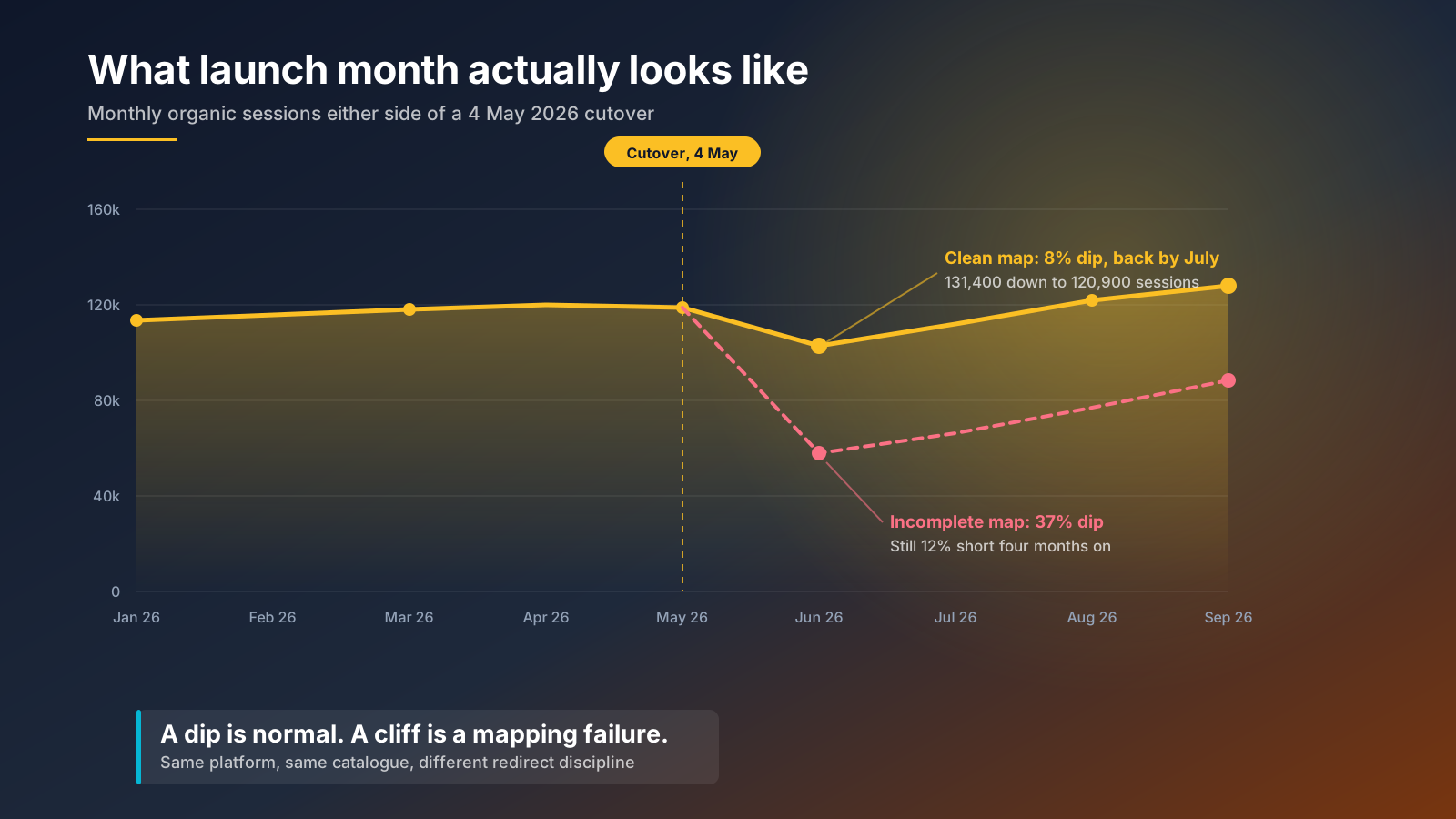
Poorly executed ecommerce migrations cost merchants 20% to 40% of organic traffic and take 6 to 12 months to recover. Well executed ones cost a single digit dip for a few weeks. The difference is almost entirely redirect discipline. Both platforms in a migration handle 301s the same way, so the losses are a process failure rather than a platform one.
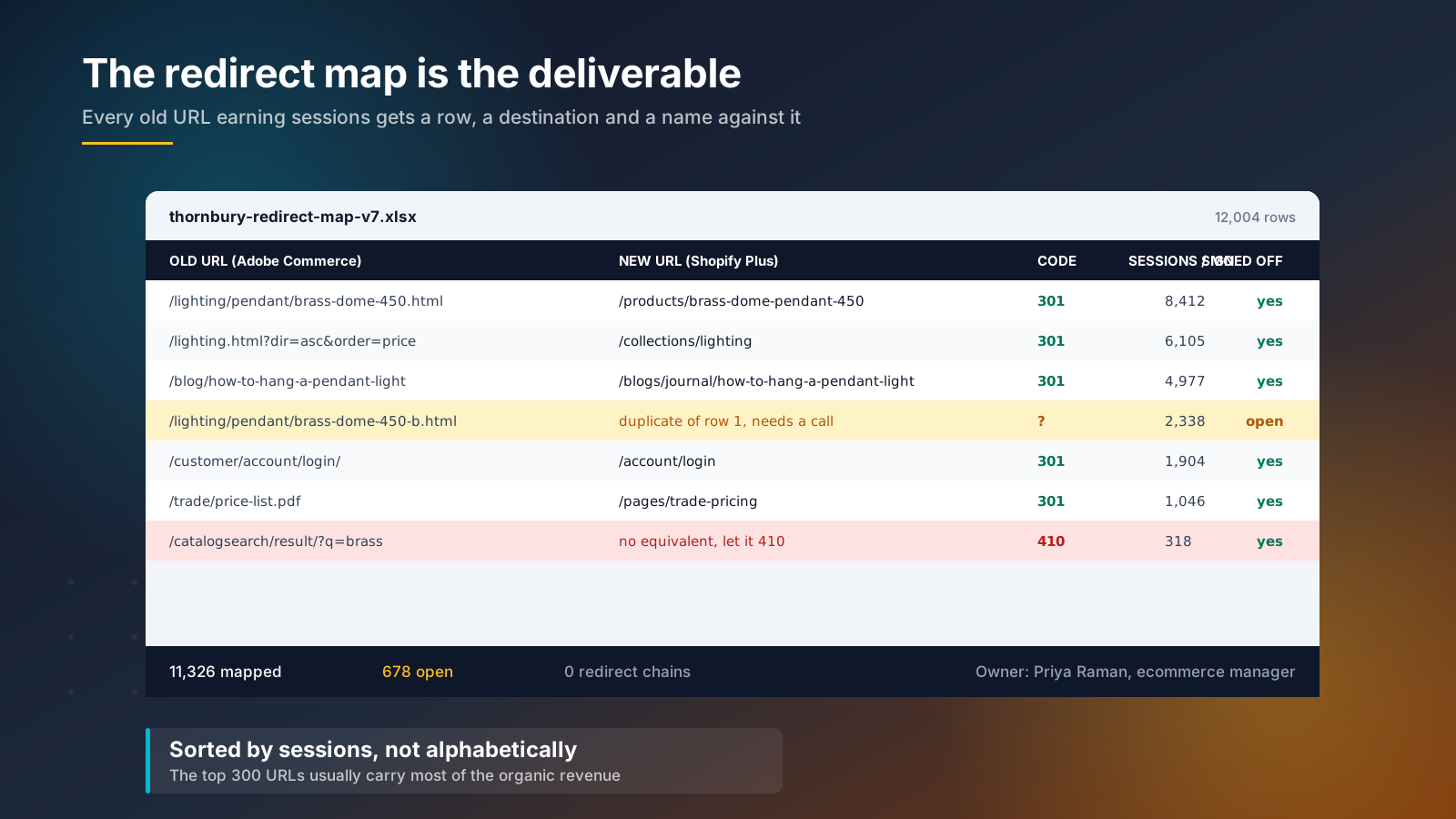
Build the redirect map as a deliverable with an owner, a version number and a sign off, not as a task somebody does the week before launch. The method we use on every migration:
- Export every URL that earned an organic session in the last 12 months from Google Search Console, plus every URL with an external backlink from Ahrefs. Combine and deduplicate.
- Sort by sessions, descending. The top few hundred URLs usually carry most of the organic revenue, so they get mapped by a human, one at a time.
- Map the long tail with pattern rules, then spot check a random sample of 200 rows by hand.
- Map to the closest equivalent page. A discontinued product goes to its collection, never to the homepage. Where genuinely nothing equivalent exists, return a 410 rather than redirecting to something irrelevant.
- Eliminate chains. Every old URL points at its final destination in one hop.
- Crawl the staging site before cutover and again within two hours of going live, then daily for the first fortnight.
Beyond redirects, keep the things search engines use to recognise the page: title tags, H1s, body copy, internal linking depth and structured data. A replatform that quietly halves the word count on category pages loses rankings for reasons that have nothing to do with redirects, and one that ships a slower mobile site loses them for reasons of performance rather than content. Our Shopify SEO migration guide covers the full pre and post launch checklist, and technical SEO for ecommerce covers the crawl and indexation work that sits underneath it.
One more thing that is newly relevant. AI search engines cite pages they can parse and trust. A migration that drops schema markup, breaks canonical tags or leaves a staging site indexable will hurt visibility in AI Overviews and assistant answers as well as in classic organic results. The same work that protects a good user experience protects the machine readable version of it.
Choosing the Platform, Then the Partner
Run the platform decision off your commercial requirements rather than a feature matrix. Write down what the business needs to do in the next three years, then ask which ecommerce platform delivers those features out of the box and which needs custom development to get there. Custom development is where total cost of ownership hides.
The practical UK shortlist for most mid-market businesses is Shopify Plus, Adobe Commerce, BigCommerce and a composable commerce build on something like commercetools. Composable and headless solutions offer real flexibility, and they also move engineering cost and system maintenance from the vendor to your own team. That is the right trade for some brands and the wrong one for most. Our article on headless ecommerce on Shopify sets out when it earns its keep, and Shopify versus Magento compares the two platforms most UK replatforming projects choose between.
Compare the shortlisted platforms on the work your business actually does rather than on published feature lists. Score each platform against the ten things that consume your team's week now, and weight scalability, integrations and day to day usability above novelty. Most businesses find two or three platforms score close together, at which point the deciding factor is which solution your merchandisers and customer service team can operate without a developer.
If B2B is in scope, be specific about which capabilities you need. Company profiles, custom catalogues and net payment terms now sit on every paid Shopify plan. Unlimited catalogues, a dedicated B2B storefront, deposits and checkout extensibility are Plus only. Our guide to B2B on Shopify goes through the detail.
Choose the partner second, and weight migration experience above portfolio design. Ask for two references from replatforming projects of similar catalogue size, ask what their organic traffic and conversion performance did in the eight weeks after launch, and ask who on the team owned the redirect map. The answers tell you more about a partner's expertise than a pitch deck does. Our guide to choosing a Shopify agency covers the rest of the diligence.
The First 90 Days After Launch
Launch is the middle of the project, not the end. Most replatforming budgets stop at go live, which is why so many brands experience a launch as a dip they never quite recover from.
Week one: crawl daily. Watch 404 rates, Search Console coverage errors and index status. Compare cart and checkout completion rates against the same weekday in the previous month rather than against the week before. Keep the old systems running in read-only mode so the team can settle data disputes.
Weeks two to four: the top 300 landing pages by revenue get checked individually for title, H1, copy, internal links and schema. Reconcile order and inventory management data between the store, the ERP and the warehouse daily. Watch subscription billing through its first full cycle.
Weeks five to twelve: start optimising rather than firefighting. Rankings typically fluctuate for a few weeks and settle. Set a baseline for organic sessions, conversion rate, average order value and mobile page performance, and hold it against the pre-launch figures. Then begin the CRO and content programme the platform change was supposed to enable, which is the growth the business signed the business case for.
Define what success looks like before you launch. Organic sessions back to baseline within eight weeks, conversion rate at or above the previous platform within twelve, and a named person accountable for each. A replatforming project without those two numbers written down tends to get judged on whether the site looks nicer, which was never the point. The point is a business that can ship features, serve customers and grow without asking the platform for permission.
If you are weighing up an ecommerce replatforming project and want a straight answer on whether it is worth doing, our Shopify Plus agency team runs platform assessments for brands in exactly this position. Get in touch and we will tell you honestly if the answer is to stay put.