 Nic Dunn, CEO, Charle Agency
What Is A/B Testing on Shopify?
A/B testing on Shopify means showing two versions of a page, price or content element to different customers at the same time, then measuring which version produces more revenue. The best A/B split testing apps for Shopify in 2026 are Shoplift and Intelligems for native Shopify theme and price testing, Visually for full-funnel personalisation, and VWO or Convert Experiences for teams that need heatmaps, session recordings and advanced targeting alongside their experiments.
The mechanics are simple. You pick one element of the page design, build a variant, split traffic evenly between control and variant, and let the test run until you have enough sessions to be confident the difference is real. For Shopify stores that covers product pages, collections, landing pages, themes, pricing, shipping thresholds, navigation and, on some plans, the Shopify checkout itself. The tools below all do this; they differ in what they let you test and how much design work each variation takes.
What makes it worth doing is that it replaces opinion with evidence. Rather than guessing which layout works, you let customer behaviour decide, and the insights compound. The result is an ecommerce store that improves continuously from real data rather than from the loudest voice in the room. That is the whole case for A/B testing tools on Shopify: they turn design and merchandising decisions into measurable ones.
Why A/B Testing Matters for Shopify Stores
Conversion rate is the percentage of visitors who complete the action you care about. Lifting it means more revenue from the ecommerce traffic you already pay for, which is why experimentation tends to have a better return than buying more visitors. A Shopify store doing 100,000 sessions a month at a 2% conversion rate adds roughly 200 orders a month by moving to 2.4%, with no extra media spend. That is growth you keep.
Adoption across ecommerce is still low. Anthony Morgan of Enavi, quoted in Convert's analysis of Shopify's Winter 2026 Edition, estimates that only around 20% of Shopify stores test at all, and that a much smaller share test well. That gap is the opportunity. Most of your competitors are still shipping design and content changes on instinct, with no measurement of the performance impact.
The other reason it matters is compounding. Each validated change is permanent. A better add-to-cart layout keeps paying out every month after you ship it, and the test results become insights that make the next hypothesis sharper. Ecommerce teams that keep a proper archive of test results stop repeating experiments they already ran two years ago, and the archive gradually becomes the most useful design document the business owns.
Most A/B testing tools for Shopify are now built for merchants rather than engineers. Visual editors mean you can build variations without writing code, while developers can still drop into custom JavaScript when a test needs it. Every serious platform ships an analytics dashboard with live metrics and segment-level insights, so you can watch a test without exporting anything. The practical differences between tools come down to integration depth, reporting design and how much traffic each one needs to give you a usable answer.
Shopify Rollouts: What Native Testing Does and Doesn't Replace
Shopify's Winter 2026 Edition introduced Rollouts, a feature that lets you stage a set of storefront changes, schedule them, and control the percentage of traffic that sees them. Because you can run more than one rollout at once, that effectively turns a rollout into an A/B test without any third-party app.
This is genuinely useful for Shopify merchants, and it is not a replacement for a testing platform. Rollouts were designed for safe deployment rather than for discovery. Convert's lead developer Ahmed Abbas put the limitation plainly: testing a headline change requires duplicating your entire theme. Rollouts deploy Shopify themes safely; A/B testing tools find out what is worth deploying in the first place.
The gaps that matter for store owners are targeting, goal tracking and statistical rigour. Rollouts split traffic, but they were not built to segment audiences by device, source or customer status, to attach custom goals such as add-to-cart or revenue per session, or to tell you when a result has reached confidence. CRO specialist Craig Sullivan raised exactly this concern, warning that without guardrails, low-traffic stores could make poor decisions on thin data.
Our read: use Rollouts for theme-level releases and phased launches, and keep dedicated Shopify A/B testing tools for anything where you actually want to learn something about customers. The two are complementary rather than competing. Shopify also shipped SimGym, a synthetic QA tool that stress-tests changes with AI shoppers before launch, which is a sensible pre-flight check but not a substitute for real customer data.
Best A/B Testing Apps for Shopify (2026)
Choosing the right A/B testing tool depends on store size, budget, technical expertise and what you actually want to test. Below are the strongest A/B testing tools for Shopify merchants in 2026, from native ecommerce apps in the Shopify App Store through to enterprise experimentation platforms. For each one we have noted the features that matter, the integration model, current Shopify App Store ratings and reviews where they are published, and the type of store it suits. Ratings and review counts are taken from the Shopify App Store A/B testing and experiments collection, which listed 34 apps at the time of writing.
1. Shoplift
Shoplift is our top pick for Shopify A/B testing. Built specifically for Shopify, it integrates directly with your theme editor so you can create test variations without leaving the Shopify admin. That native integration means faster setup, no separate script tag to manage and no visible flicker while the variant loads.
What sets Shoplift apart is Lift Assist, which analyses millions of shopper sessions to generate high-converting variations automatically. Once a winner is identified you can apply it with one click. The app also ships pre-built theme sections, layouts and templates you can test immediately, which shortens the learning curve for store owners who have never run an experiment. Reporting is deliberately plain, surfacing the insights that decide the test rather than every metric it collects.
Shopify App Store rating: 4.9 stars from 124 reviews.
Pricing: From $74/month based on monthly unique visitors. 14-day free trial available.
Best for: Shopify merchants who want native theme editor integration and AI-assisted test suggestions.
2. Intelligems
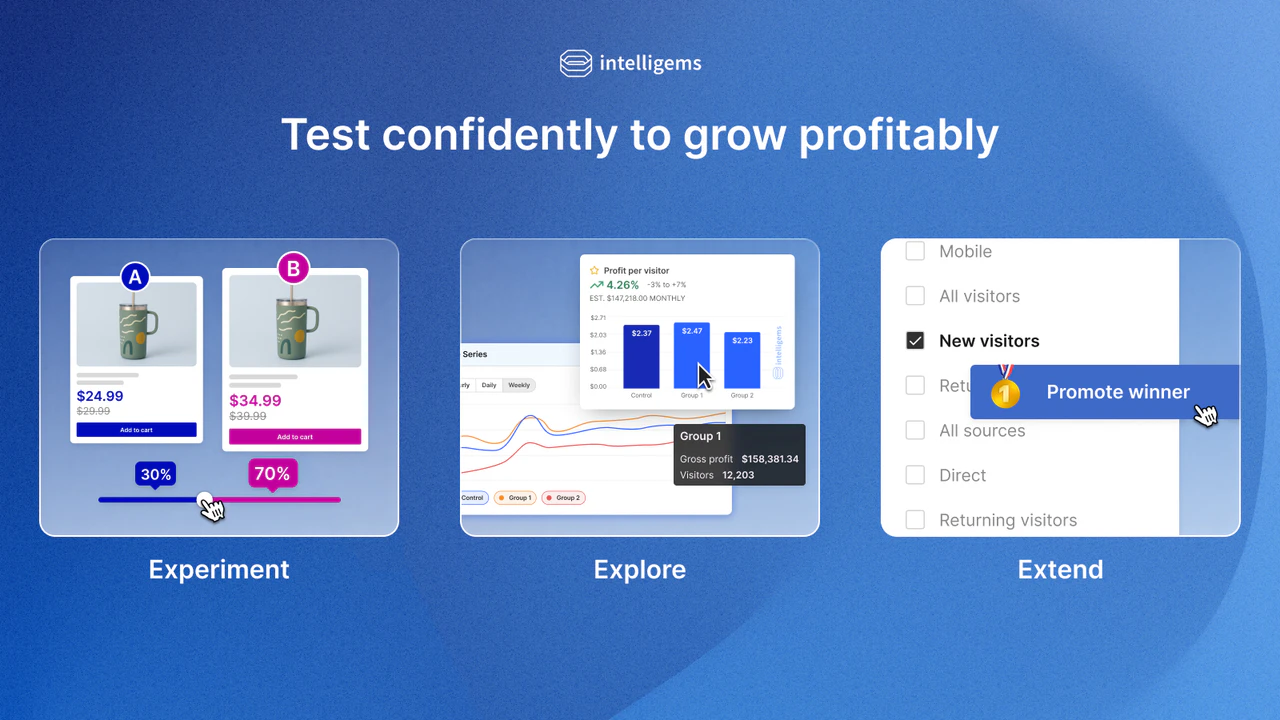
Intelligems is the most popular price testing app on Shopify, and the right choice for merchants who care about margin rather than conversion rate alone. It lets you run shipping tests, discount tests and content tests as well as straight price tests, so you can find the combination that maximises profit rather than orders.
Audience segmentation is strong. You can target variations at specific audiences by device, geography, traffic source or returning customer status, and create personalised campaign links that apply a discount at checkout without a code. The analytics dashboard tracks cost of goods sold, so revenue tracking reflects true profit rather than gross sales, and it reports AOV alongside conversion. For ecommerce brands where margin is the constraint, those insights are worth more than a conversion percentage.
Shopify App Store rating: 4.8 stars from 157 reviews.
Pricing: From $49/month. Higher tiers add content testing and profit optimisation.
Best for: Brands running price and shipping tests where margin matters more than raw conversion.
3. Visually
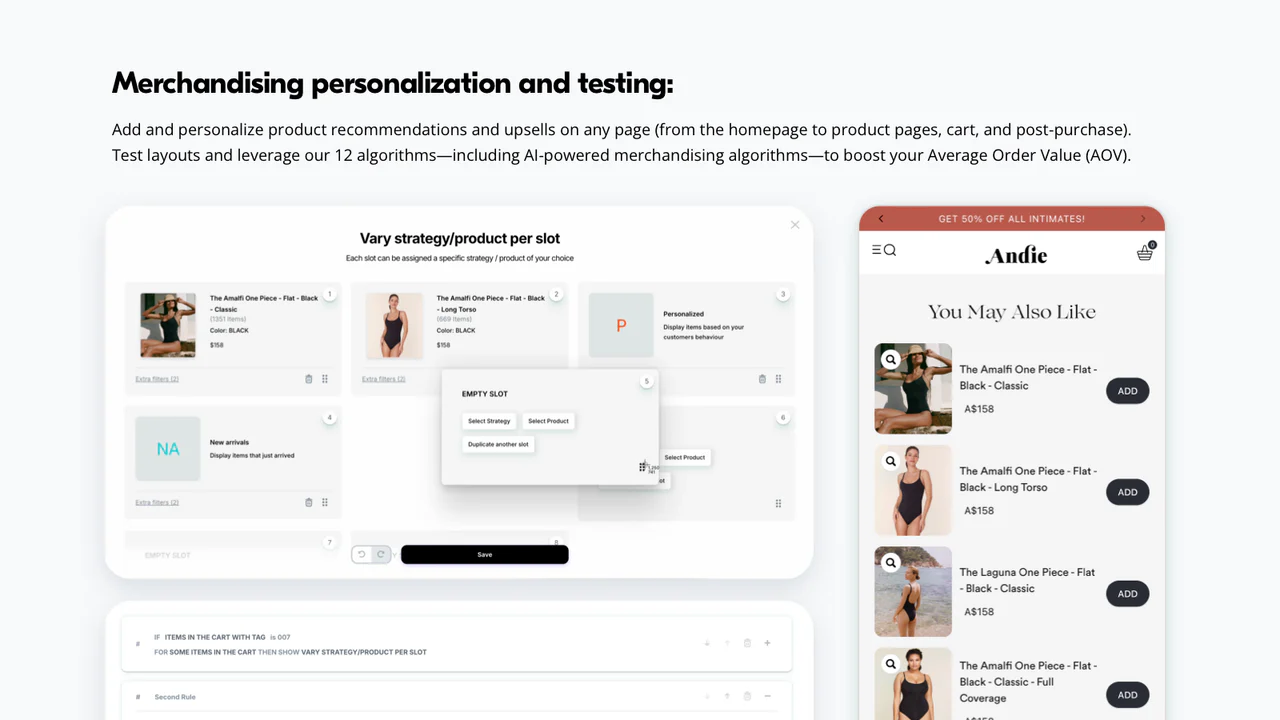
Visually is an AI-assisted A/B testing and personalisation platform built for full-funnel optimisation. You can test across every stage of the journey, from homepage and collections through product pages, cart, checkout and post-purchase upsells, which makes it useful for funnel testing rather than single-page experiments.
The no-code visual editor builds variations in minutes and the platform connects to your Shopify catalogue and behaviour signals to deliver personalised experiences to different audiences. The architecture is built for page speed with no flicker, which matters because a variant that loads visibly late pollutes your own test results and quietly damages the very design you are trying to measure.
Shopify App Store rating: 4.6 stars from 121 reviews.
Pricing: Free plan available. Paid plans scale with usage.
Best for: Merchants who want full-funnel A/B testing combined with personalisation.
4. VWO (Visual Website Optimizer)
VWO integrates with Shopify and pairs experimentation with research tools. Alongside the visual editor for building variants, you get heatmaps, session recordings and on-site surveys, so the same platform tells you what to test as well as whether the test worked.
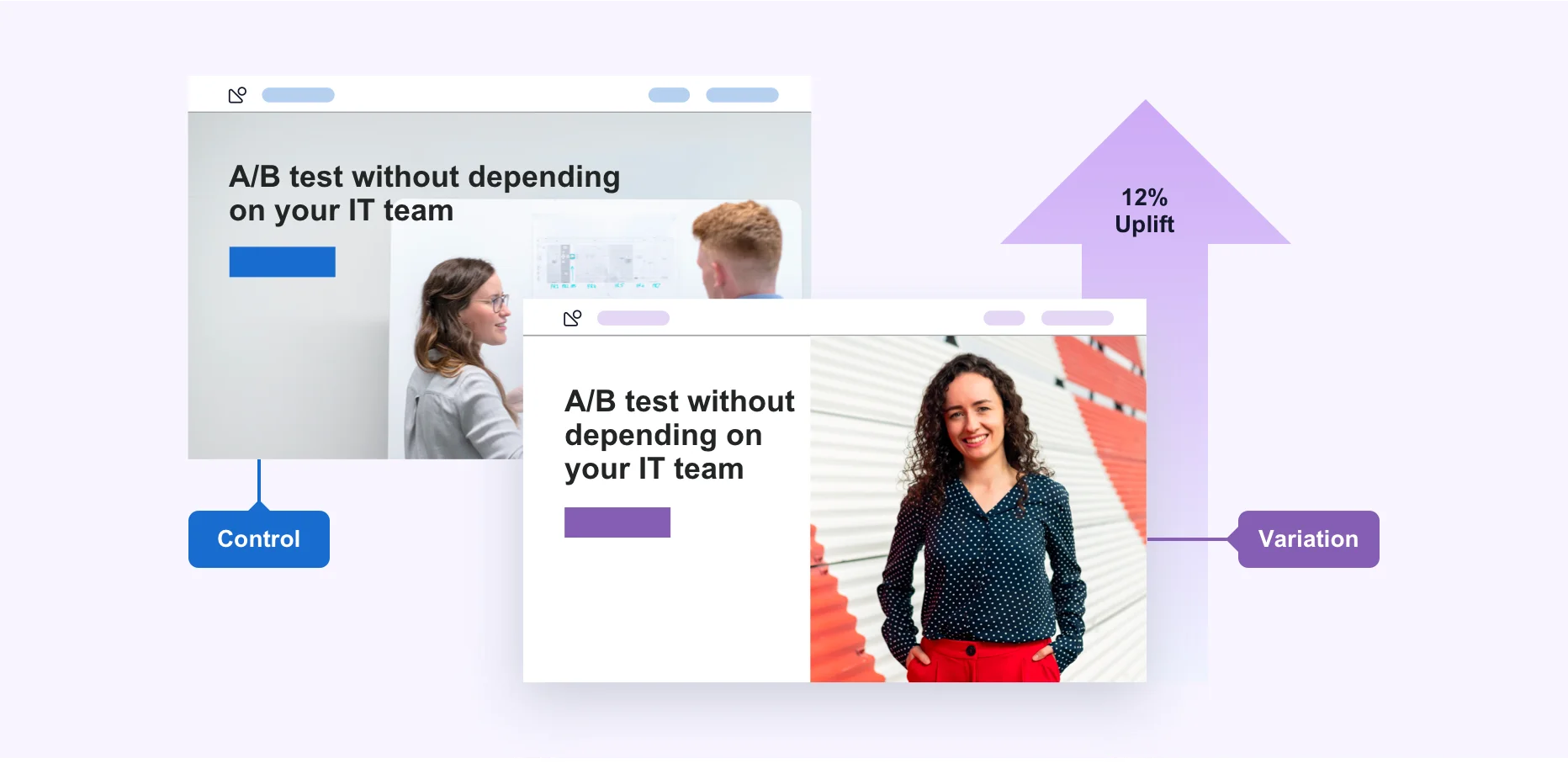
VWO also supports split URL testing, which sends half your visitors to an entirely different URL. That is the right approach for radical design changes where the variation is a different page rather than a modified one. Server-side testing, feature flags, custom JavaScript and a full API make it a fit for ecommerce teams with developers, and the reporting features go deeper than most native Shopify apps. The published entry paid tier starts around $393 per month, and there is a limited free version for basic tests.
Pricing: Free tier available. Paid plans from roughly $393/month, with custom enterprise pricing.
Best for: Teams who want A/B testing, heatmaps and session recordings in one experimentation platform.
5. Convert Experiences
Convert Experiences is the platform of choice for a lot of CRO agencies, largely because of how far its targeting and goal configuration go. The visual editor handles standard variants, while advanced goals, custom JavaScript and audience segmentation cover the cases where a templated tool runs out of road.
Convert is unusually strong on privacy and documentation, with GDPR tooling, ISO 27001 and SOC 2 certification, and a well-maintained developer knowledge base covering its JavaScript API and integration options. It also publishes a Shopify price testing guide and an MCP server for agent-driven workflows. Customer support is a genuine differentiator here rather than a marketing line, which is why agencies running experimentation for multiple ecommerce clients tend to standardise on it.
Pricing: From $99/month, scaling with traffic. 15-day free trial.
Best for: Agencies and mid-market brands who need deep targeting without enterprise complexity.
6. AB Tasty
AB Tasty combines A/B testing, multivariate testing and personalisation campaigns behind one visual editor. Reporting is thorough, with segment-level breakdowns that show whether a variant that looks flat overall is actually winning on mobile and losing on desktop.
It suits ecommerce brands who want experimentation and personalisation managed by the same team on the same platform, rather than bolting a separate personalisation tool onto a testing tool. The Shopify app is free to install with usage-based pricing behind it, and it carries 4.7 stars from 6 reviews in the Shopify App Store, a small sample that reflects how recently it arrived rather than the maturity of the product.
Pricing: Free to install. Custom pricing based on traffic and features.
Best for: Brands running testing and personalisation as one programme.

7. Optimizely
Optimizely is the enterprise standard, and Google recommended it as a migration path when Google Optimize was retired in September 2023. You can build experiments without code, testing headlines, images, buttons, prices and entire page layouts, then read detailed reports with statistical significance calculations built in.
Multivariate testing, server-side experimentation and feature flags are all supported, which is why it lands with large teams running dozens of concurrent tests across web and app. The trade-off is a real learning curve and enterprise contracts to match. For a single Shopify store it is usually more platform than the problem requires.
Pricing: Custom enterprise pricing.
Best for: Enterprise brands with a dedicated optimisation team and a mature programme.
8. Crazy Egg
Crazy Egg is a behaviour analytics tool with A/B testing attached rather than the other way round. Its heatmaps, scrollmaps and session recordings show where visitors actually look and where they stall, which is the research half of the job that most merchants skip.
Used properly it feeds your test roadmap. Watch twenty visitor sessions on a product page, find the point where people hesitate, then build a variation that addresses it. Those qualitative insights are what turn a list of design ideas into a prioritised one. As an entry point for ecommerce stores new to CRO it is hard to beat on price.
Pricing: From $29/month. Advanced plans from $249/month.
Best for: Stores that need research and heatmaps before they need a full testing platform.

9. Dynamic Yield
Dynamic Yield by Mastercard uses real-time behaviour data and machine learning to personalise experiences, with A/B testing built around product recommendations, homepage layouts and promotional banners.
Its strength is deciding which of several experiences to serve each visitor automatically once a test has run, rather than shipping one winner to everyone. That only pays off at volume, so it belongs on the enterprise end of the list alongside Optimizely and Kameleoon. Its limitations are the same as any enterprise platform: implementation takes engineering time and the reporting rewards teams who already know what they are looking for.
Pricing: Custom enterprise pricing.
Best for: Enterprise brands running AI-driven personalisation at scale.
How to Choose the Right A/B Testing App
Match the tool to the constraint that is actually blocking you, not to the longest feature list. Four questions settle it for most ecommerce stores.
What are you testing? Shopify themes, theme sections and page elements point to Shoplift. Prices, shipping rates and bundles point to Intelligems. Whole-page redesigns need split URL testing, which means VWO or Convert. Recommendations and audience-level experiences point to Dynamic Yield.
How much traffic do you have? Below roughly 5,000 visitors a month on the target page, a lighter, more user-friendly native app plus a research tool such as Crazy Egg will teach you more about your customers than an enterprise platform you cannot feed with data.
Who is running it? If nobody on the team writes code, prioritise a genuine no-code editor, good documentation and responsive customer support, and expect a shorter learning curve from Shopify-native tools. If you have developers, a JavaScript API, server-side capability and deeper integration with your existing analytics stop being nice-to-haves.
What does a mistake cost? Price and checkout tests touch revenue directly. Those deserve a platform with proper audience segmentation, a clear control group and reliable revenue tracking rather than the cheapest option in the Shopify App Store. Read the reviews before you commit: a 4.9 rating from 124 reviews tells you more about day-to-day reliability than any features list, and low ratings on ecommerce apps almost always trace back to support or billing rather than the testing engine.
| App | Best for | Entry pricing | Rating |
|---|---|---|---|
| Shoplift | Native theme testing | $74/mo | 4.9 (124) |
| Intelligems | Price and profit testing | $49/mo | 4.8 (157) |
| Visually | Full-funnel personalisation | Free plan | 4.6 (121) |
| VWO | Testing plus research tools | ~$393/mo | Not listed |
| Convert Experiences | Agencies and deep targeting | $99/mo | Not listed |
| AB Tasty | Testing plus personalisation | Free to install | 4.7 (6) |
| Optimizely | Enterprise programmes | Custom | Not listed |
| Crazy Egg | Heatmaps and research | $29/mo | Not listed |
| Dynamic Yield | AI personalisation at scale | Custom | 5.0 (2) |
What to Test on Your Shopify Store
Knowing what to test matters as much as choosing the right testing tool. These are the highest-impact areas for most Shopify stores, ranked roughly by how reliably they move performance.
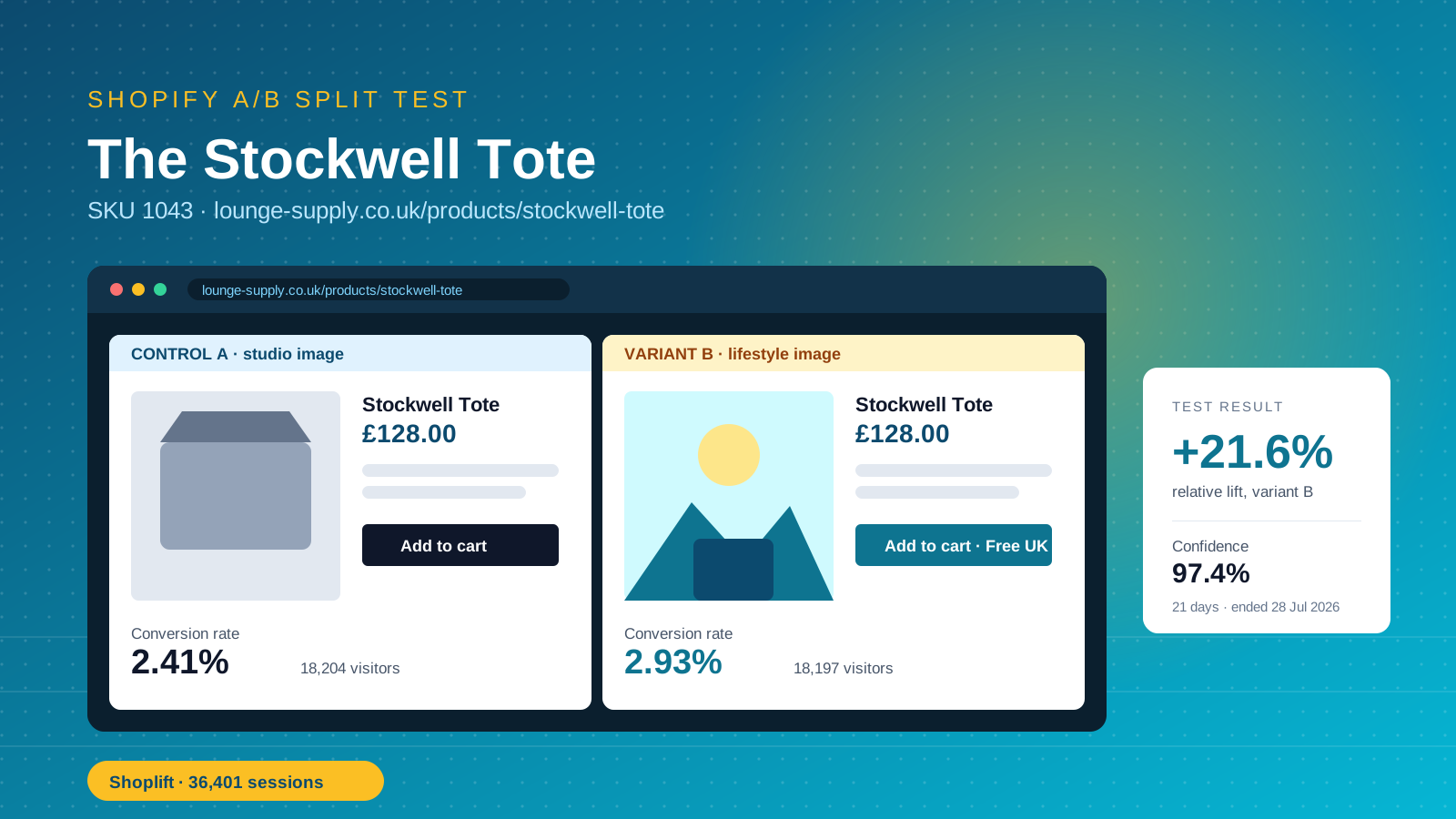
Product pages: Test layouts, image sizes and gallery order, product descriptions, and where the add-to-cart button sits. Test lifestyle photography against studio shots. Small changes to page elements here move conversion more reliably than anywhere else on the ecommerce site, and product page design is where most Shopify tools give you the richest variation controls.
Pricing and offers: Test price points, discount structures, bundles and free shipping thresholds. Intelligems exists for exactly this. Shipping tests in particular tend to be under-run relative to their impact on AOV.
Homepage: Test hero banners, featured products and navigation design. Replacing a rotating slider with a prominent search bar is one of the most reliably positive changes in ecommerce, and it is easy to validate before you commit. Homepage layouts also carry enough traffic to reach a result quickly.
Collections: Test grid layouts, the default sort order, filter placement and how many products load before pagination. Shopify collections carry more commercial traffic than most merchants realise, and because they sit above product pages in the funnel they give faster test results.
Landing pages: Paid traffic lands on templates and layouts that rarely get the same scrutiny as the core site. Test headline copy, review and rating placement, and form length on your highest-spend landing pages first. Landing pages tend to be the fastest place to prove that a design change moves revenue.
Cart and checkout: Test cart layouts, trust signals, upsell placement and how shipping cost is communicated before the customer reaches payment. The impact here is usually larger than anything you can do to the product page content.
Mobile specifically: Run device-split analysis on every test. A variation can win on desktop and lose on mobile, and reporting the blended number hides it. Mobile is where most Shopify ecommerce traffic now sits, so a mobile-losing winner is usually a losing test.
How to Run a Shopify A/B Test You Can Trust
Most of the value in a Shopify testing programme sits before the test starts. Shopify's own guide argues that roughly 80% of the work is conversion research rather than the test itself, and that is the right emphasis.
1. Find the problem with analytics. Look for pages with high exit rates, sharp drop-offs between steps, or a mobile conversion rate far below desktop. Shopify analytics will show you where; a dedicated analytics integration will show you for which audiences. Confirm your events and revenue tracking fire correctly before you rely on them.
2. Add qualitative insight. Watch visitor session recordings and read on-site survey responses. Analytics tells you where visitors leave; recordings tell you why. The two together produce the insights a hypothesis is built on.
3. Write a real hypothesis. Craig Sullivan's hypothesis kit is the cleanest format: because we saw X, we expect that Y will cause Z, measured by W. "Make the product page nicer" is not a hypothesis. "Replacing studio images with lifestyle images will lift add-to-cart by 10% within two weeks, because lifestyle images show scale and use" is.
4. Prioritise. ICE (Impact, Confidence, Ease), PIE and PXL all work. Score each idea, multiply, and run the highest scorer first. The framework matters less than having one, because it stops the roadmap being decided by seniority.
5. Split traffic evenly and leave it alone. Randomise assignment, keep device and geography balanced across variants, and run one test per page at a time. Concurrent tests on the same template create interaction effects that make both results unreadable.
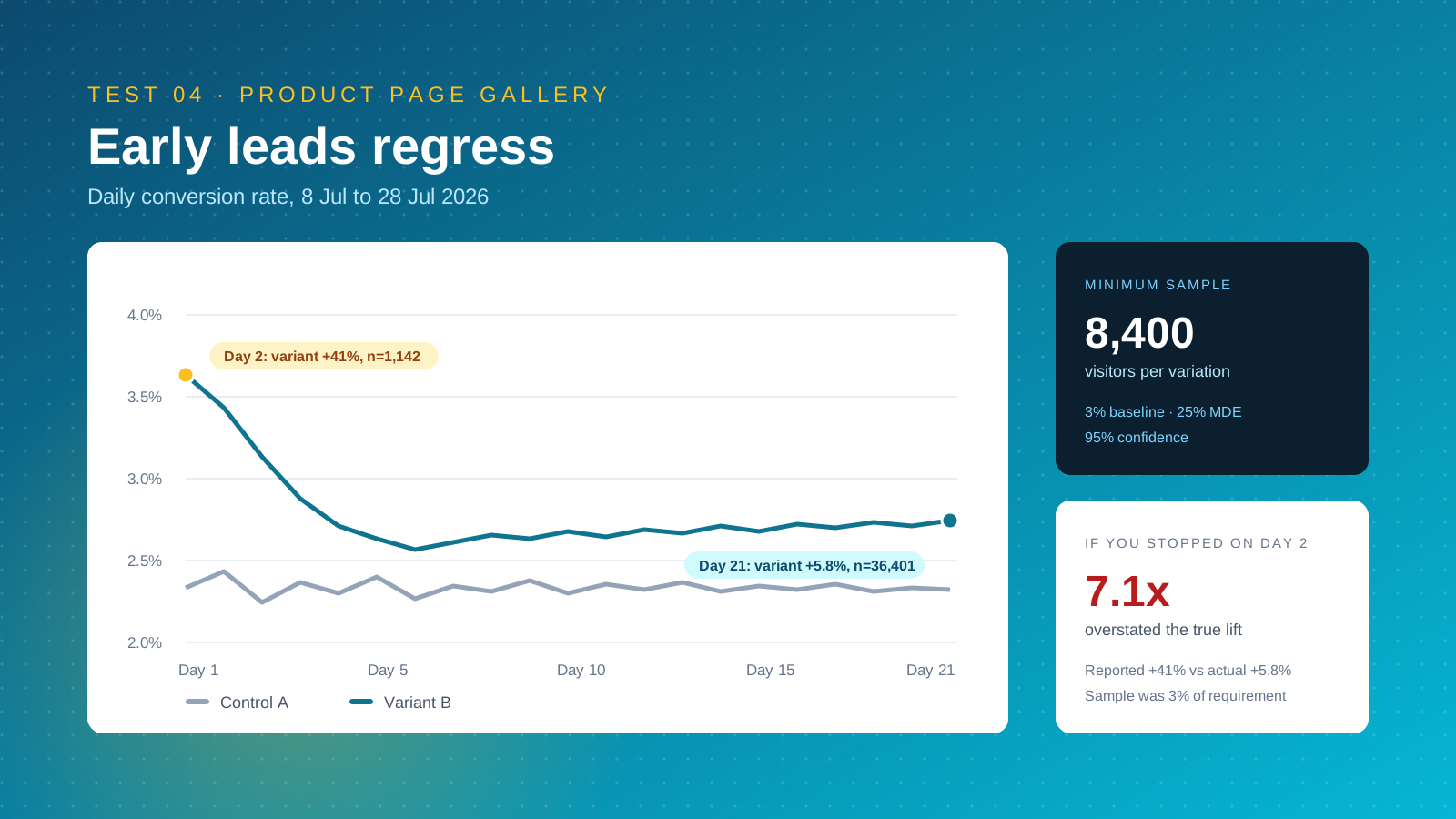
6. Run for whole business cycles. Two full weeks minimum, and two to four weeks for most stores, so weekday and weekend behaviour are both represented. Ending on day three because the variant is 8% up is how teams ship losers.
7. Analyse by segment, then archive. Break test results down by device, new versus returning, and traffic source before you call a winner. Analysis at the segment level is where most of the useful insights live. Then write it down. A test archive is the single cheapest asset an optimisation team can build, and it answers most of the questions a new hire will ask in their first month.
Traffic and Sample Size: Do You Have Enough?
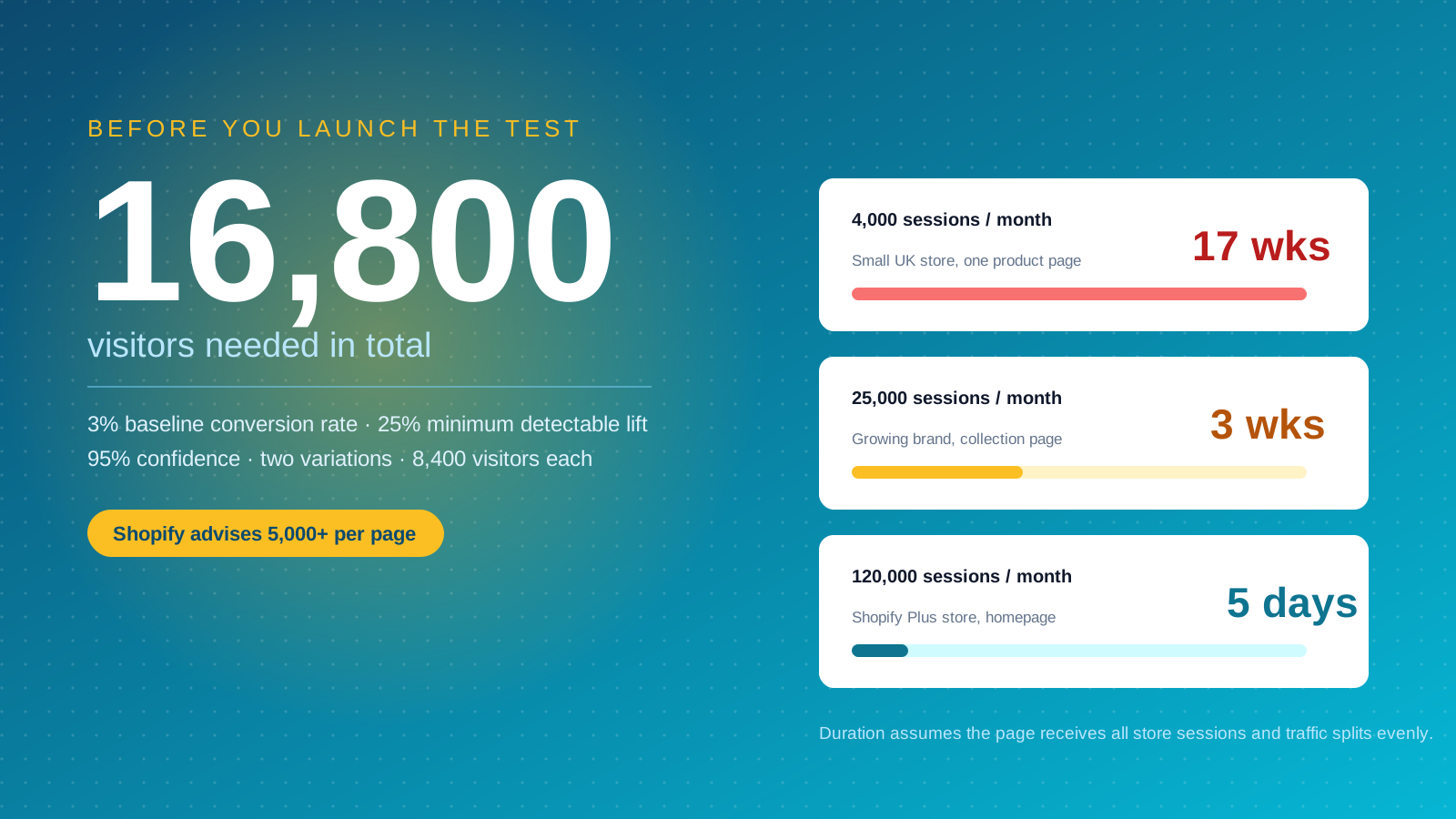
Traffic, not tooling, is the real constraint for most Shopify ecommerce stores. Statistical significance is the measure of confidence that the gap between your variants is real rather than noise, and the conventional threshold is 95%, meaning a 5% chance the result is chance alone.
The maths is unforgiving at small scale. At a 3% baseline conversion rate, detecting a 25% relative lift at 95% confidence needs roughly 8,400 visitors per variation, or around 16,800 in total. A store doing 4,000 sessions a month on that page needs four months to finish one test.
Three practical responses. First, test bigger design changes. Radical layout variations produce a larger minimum detectable lift than a button colour, so they resolve faster. Second, test higher up the funnel where visitor volume is greater, such as Shopify collections or the homepage rather than a single product page. Third, use revenue per session as your primary metric where you can, since it captures both conversion and order value and often moves sooner than conversion rate alone.
Run a sample size calculation before every test. Shopify recommends at least 5,000 visitors to a page for a meaningful test, and most A/B testing tools now include a calculator. If the required duration exceeds six weeks, pick a different test.
Testing the Shopify Checkout: What's Actually Possible
Checkout is where the most valuable ecommerce tests live and where Shopify's platform limitations bite hardest. On standard plans the checkout is hosted by Shopify on a separate domain, which means third-party testing scripts cannot manipulate it, and cross-domain cookie handling breaks visitor assignment between the storefront and checkout. Safari's default tracking prevention makes this worse.
On Shopify Plus you get checkout customisation through checkout extensibility, so you can test trust badges, upsell blocks, field order and messaging inside the checkout itself. That is one of the clearer arguments for the Plus tier for a high-volume store.
Every merchant can still test the journey into checkout, which is where most abandonment originates. Cart page layout, shipping cost visibility, payment method icons, express checkout button placement and the returns content all sit on your own domain and are fully testable, and they have a direct impact on completion. Baymard's research puts cart abandonment around 70%, and most of that decision is made before the checkout loads.
Shopify's Winter 2026 update also added checkout customisation per market and unlisted products, which together open up segmented pricing tests that were previously awkward to set up.
A/B Testing Best Practices
Run tests long enough: At least two weeks, and ideally two to four, so daily and weekly traffic patterns are represented. Let the platform's significance indicator confirm the result rather than calling it early.
Test one thing at a time: Unless you have multivariate traffic levels, change a single variable per test. Otherwise you know the page improved but not which change caused it.
QA the variation on every device: Check each version renders correctly on mobile, tablet and desktop before launch, and confirm there is no visible flicker as the variation loads. Flicker is the most common technical fault in Shopify A/B testing and it biases results against the variant.
Watch revenue, not just conversion: A variation that lifts conversion by pushing a cheaper product can reduce revenue per session and hurt overall growth. Track AOV alongside conversion rate on every test.
Document everything: Record the hypothesis, the setup, the segments and the outcome, including the losers. Losing tests are cheaper learning than winning ones and they compound just as well.
Keep testing: Optimisation is continuous. Customer expectations shift, competitors change, Shopify themes get replaced, and a winner from 2024 is not automatically still the winner. Re-test your biggest assumptions annually.
Common A/B Testing Mistakes to Avoid
Stopping early. Early leads regress. A variant 20% up after two days is almost always noise, and calling it produces a "win" that never shows up in the monthly numbers.
Testing during a redesign or peak. Tests need stable conditions. Running one through Black Friday, a site migration or a stock outage gives you results about the event, not the variant.
Ignoring segments. A flat overall performance result frequently hides a strong mobile win and a desktop loss. Always break results down before archiving them.
Running concurrent tests on the same template. Interaction effects make both results unreliable. Sequence them instead.
Optimising the metric instead of the business. Click-through rate on a banner is easy to lift and easy to lift in ways that cost you money further down the funnel. Tie every test back to revenue.
Skipping the research. A tool will happily run whatever test you configure. It will not tell you that you tested the wrong thing.
Where We'd Start If This Were Our Store
Given the choice between a sophisticated platform and a sensible first test, we would take the sensible first test every time. The most common failure we come across is not a bad tool. It is a store paying for an experimentation platform while running two tests a quarter, each too small to reach significance, on pages nobody researched first.
So our answer is a specific one. Start with Shoplift or Intelligems depending on whether your bottleneck is layout or price, pair it with a research tool for heatmaps and session recordings, and commit to a fixed testing cadence before you commit to a licence. Cadence beats capability for the first year. A team shipping one properly powered test every two weeks on a $49 app will learn more than a team running quarterly experiments on an enterprise contract.
We would also push back on the instinct to test small. Button colours are the classic beginner test and they are close to useless for a store under 50,000 monthly sessions, because the effect size is too small to detect before the test expires. Test the things that change the shopper's decision: what the product is, what it costs, what it costs to ship it, and what proof you offer that it is worth buying.
On Rollouts specifically, we think most Shopify stores should adopt them for deployment and ignore them for discovery. Staging theme changes and releasing to 10% of traffic first is good engineering practice regardless of whether you run a CRO programme. It is not, on its own, a testing strategy, and it will not tell you anything new about your customers.
Conclusion
A/B testing is the most reliable way to improve Shopify store performance and increase conversions without buying more traffic. Shoplift and Intelligems give you the best native Shopify experience, VWO and Convert Experiences suit teams who need research tools and deep targeting, and Optimizely or Dynamic Yield fit enterprise programmes.
Whichever of these Shopify A/B testing tools you pick, the discipline matters more than the software. Research first, write a real hypothesis, calculate the sample size, run the full cycle, and read the segments before you call a winner. Getting the conversion rate fundamentals right is what makes the tests worth running, and a well-structured Shopify site design gives you something worth testing in the first place.
For merchants with requirements no app covers, Charle builds custom Shopify apps and runs testing programmes end to end. Either way, the goal is the same: fewer opinions, more evidence, and an ecommerce store whose performance and growth improve measurably every quarter.