 Nic Dunn, CEO, Charle Agency
What is Mobile SEO for Ecommerce?
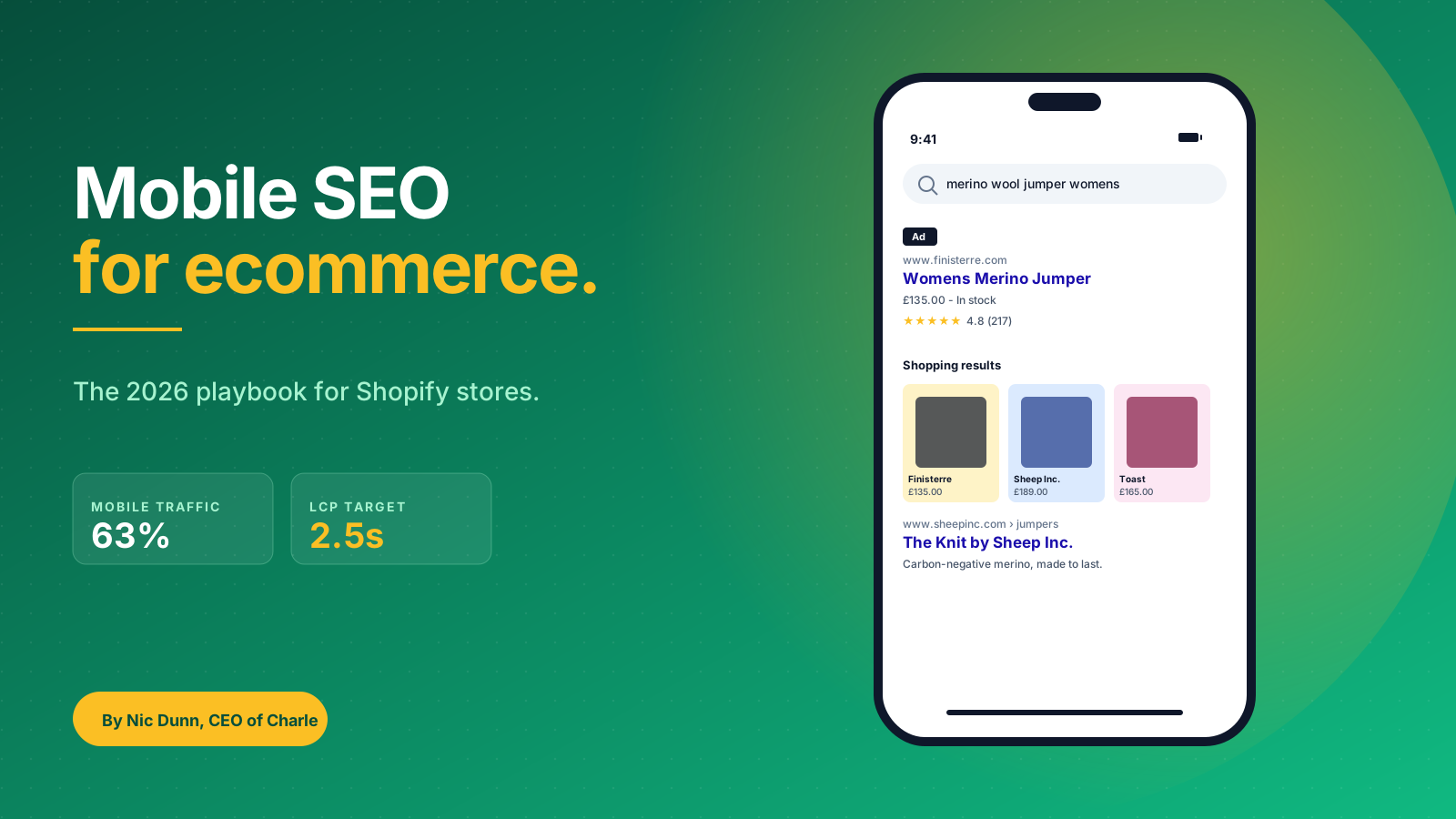
Mobile SEO, also called mobile search engine optimization, is the practice of optimising ecommerce sites so that smartphones and tablets can find them, load them quickly across all screen sizes, and complete a purchase without friction. Modern mobile web design treats handheld devices as the default rather than a fallback. For an ecommerce site that means three things working together: a mobile experience Google and other search engines can crawl and index properly across devices, technical performance fast enough to keep mobile devices and their internet users engaged, and on-page signals (product schema, mobile-friendly content, accelerated checkout process) that earn rich snippets in mobile search rankings.
It's worth being clear about the difference between mobile SEO and "regular" SEO. They're not separate disciplines. Since Google completed its move to mobile-first indexing in 2023, the mobile version of your site IS the version Google ranks. Desktop SEO without mobile considerations is not an SEO strategy, it's a gap. For a broader overview, our guide to Shopify SEO covers the foundations; this article goes deep on the mobile-specific layer.
At its core, mobile SEO for ecommerce is about respecting the constraints of the phone. Smaller screen sizes, slower network, fatter thumbs, shorter attention spans across consumers and the wider audience. The brands that win mobile SEO design for those constraints from the start; the brands that lose treat mobile as a shrunken desktop site, and pay for it in conversion rates and customer satisfaction.
Why Mobile SEO Matters More for Online Stores
Mobile is not "a channel" for ecommerce anymore. It is the channel.
Roughly 63% of ecommerce traffic in the UK now comes from a mobile device, and that share has been climbing every year since 2018. On Shopify specifically, mobile commerce accounted for 71% of all checkouts in the 2024 holiday peak. For most businesses we work with, mobile is now where the majority of organic clients first encounter the brand. If your mobile experience is even slightly worse than your competitors', you are losing the majority of your potential orders before they ever see a product page.
There are three reasons mobile SEO matters more for ecommerce than for almost any other type of site:
- Mobile traffic converts. Mobile conversions are lower than desktop on most stores (around 2.1% on mobile vs 3.7% on desktop, according to Shopify's 2025 benchmark), but the sheer volume of mobile sessions means most of your revenue is now coming from phones. Even a small uplift in mobile conversions can outweigh substantial growth in desktop traffic.
- Mobile is where discovery happens. Mobile search drives the top of your funnel. People search for "best running trainers womens" on their phone, click a result, save it, and come back to buy later. If you're not in the mobile rankings, you're not in the consideration set, and the businesses that win discovery win the long-term clients.
- Mobile rewards the prepared. Mobile rankings are denser than desktop. AI Overviews, image carousels, shopping packs, local packs and rich results all compete for the same screen. A site that's set up properly for mobile rich results dominates that real estate and earns measurable growth in qualified visitors.
The flip side is that mobile penalises sloppy sites harder than desktop. A two-second slowdown on desktops is annoying; the same delay on a 4G connection costs you measurable purchases, lower conversion rates, lower SEO performance, and a lower rankings ceiling. Mobile shoppers abandon a slow cart at 1.6 times the rate of desktop shoppers, and bounce rates climb steeply for every additional second of load time. User behavior data from Shopify and Google consistently shows the same trend across ecommerce sites and categories: mobile is unforgiving. For ecommerce businesses, the cost of poor mobile SEO is not a slightly lower ranking, it's a slightly lower revenue line.
Mobile-First Indexing: What Google Looks at Now
Google has used the mobile version of websites as its primary index since 2023. For ecommerce stores, this changed which parts of your site actually matter for ranking. The desktop site used to be the source of truth; today it's the fallback.
What this means in practice for a Shopify store:
- The mobile version is the ranking version. Whatever Google sees when it renders your site as Googlebot Smartphone is the version that gets indexed. If a piece of content (a product description, an FAQ block, a customer review) is hidden behind a "show more" tap on mobile but visible by default on desktop, the mobile rendering is what counts.
- Parity matters. Your mobile and desktop versions should serve the same content, structured data and metadata. Stripping content out of the mobile view to make the page look cleaner is one of the most common ranking-killing decisions we see Shopify brands make.
- Crawlable lazy loading. If you lazy-load product images, reviews or recommendation widgets, make sure the mobile renderer can still see them. Use the loading="lazy" attribute rather than custom JavaScript schemes that hide content from crawlers.
Shopify's responsive themes (Dawn, Sense, Refresh and the rest) handle the basics here automatically. They serve the same HTML to mobile and desktop, with CSS deciding the layout. That's the right approach: one site, one URL, one set of content, served responsively. Stay away from older patterns like m-dot subdomains (m.yourstore.com) or device-detection redirects, which create exactly the parity problems Google warns about.
The check we run on every new audit is simple: open the live store in Google Search Console's URL Inspection tool, view the rendered mobile HTML, and confirm every product description, review block and FAQ is in the source. If something only appears on desktop, it doesn't exist for SEO purposes.
Core Web Vitals on Mobile: The Speed Targets That Decide Rankings
Core Web Vitals are Google's measurable speed and stability signals, and they're scored separately for mobile and desktop. The mobile thresholds are the ones that matter, because mobile is the ranking version.
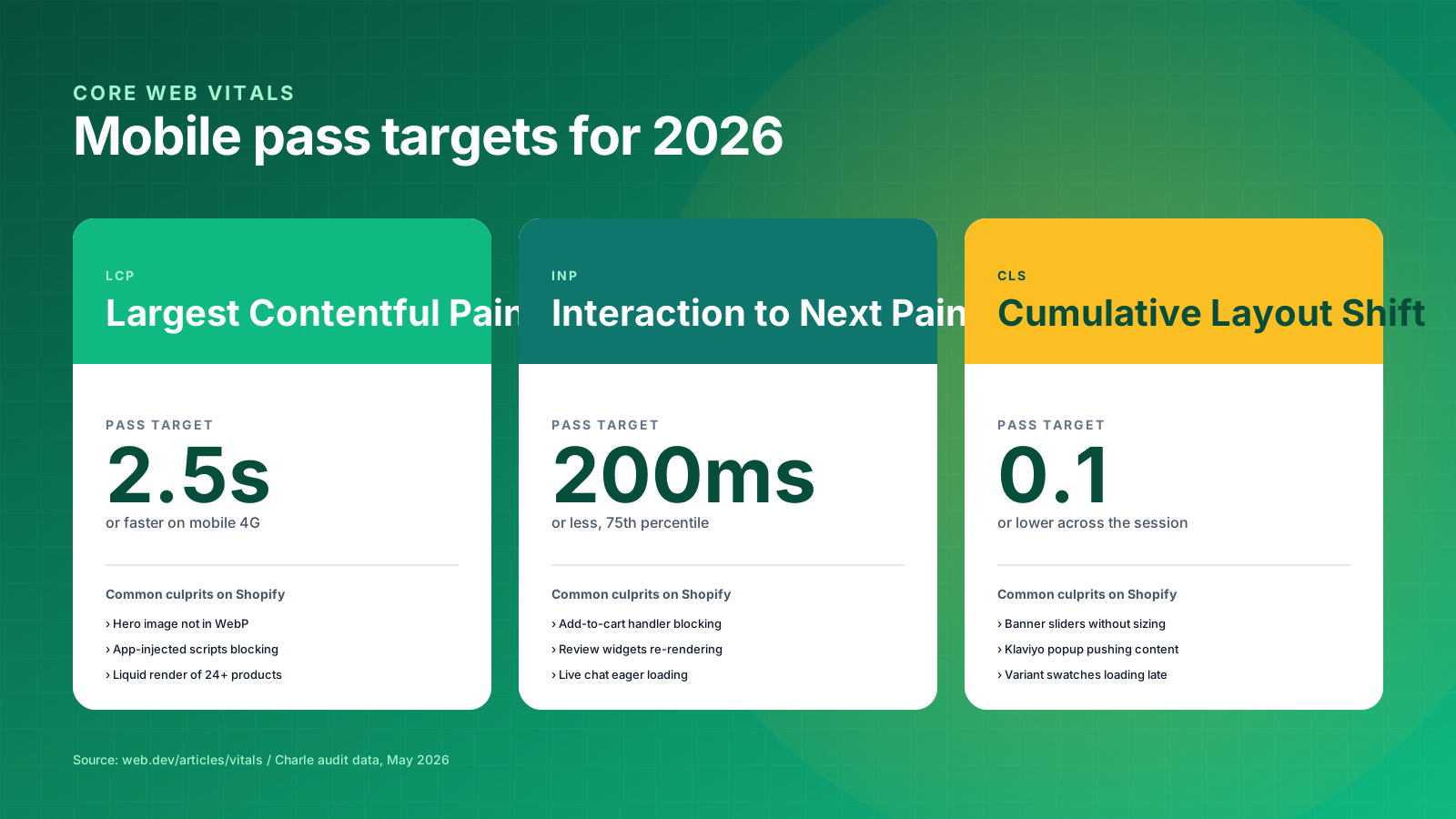
There are three vitals you need to clear on mobile in 2026:
- Largest Contentful Paint (LCP): 2.5 seconds or faster. This measures how quickly the largest above-the-fold element loads, usually your hero image or product photo.
- Interaction to Next Paint (INP): 200 milliseconds or less. This replaced First Input Delay in March 2024 and measures the responsiveness of every interaction across a session, not just the first one.
- Cumulative Layout Shift (CLS): 0.1 or lower. This catches images, banners and embeds that shift the page as it loads, which is especially painful on mobile when a user is about to tap "Add to cart".
On Shopify, the mobile LCP fight is usually won or lost on three things: the hero image format and size, the number of apps injecting render-blocking scripts, and Liquid templates that loop through too many products on the homepage. Switch hero images to WebP, compress media files, defer non-critical app scripts, lean on browser caching for static resources, and limit homepage product loops to 12 items above the fold; you've solved 80% of the LCP problem on a typical Dawn-themed store. Speed optimization at this level lifts site speed, page speed and overall mobile-friendliness in one pass.
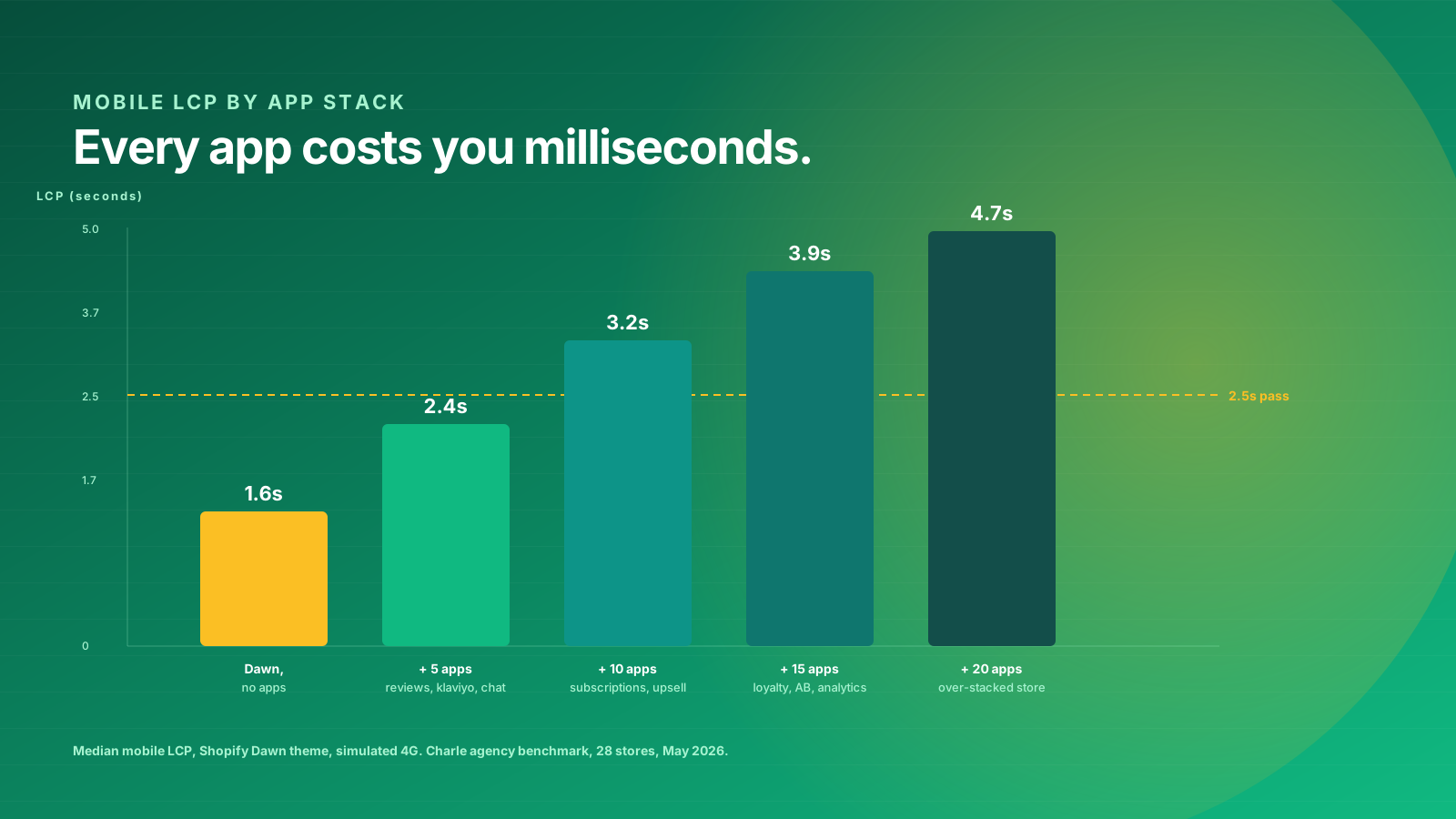
INP is the newer and stricter vital, and it's where most Shopify stores are now failing. The culprit is almost always third-party app JavaScript, especially review widgets, live chat, and analytics that re-render the DOM on every interaction. Audit your app stack ruthlessly: every Shopify app adds an average of 50 to 150ms to INP on mobile, and a store running 20+ apps will struggle to pass.
CLS is the easiest of the three to fix and the easiest to ignore. The fix is mechanical: set explicit width and height attributes on every image, reserve space for embeds (Instagram, YouTube, review carousels), and keep popups (Klaviyo signup forms, age gates) out of the main content flow. Use Google's PageSpeed Insights tool to check your live store and the Chrome User Experience Report (CrUX) for real-world field data.
For a deeper dive into the technical side, our guide to optimising a Shopify store for mobile covers the implementation steps in detail.
Mobile UX Signals Google Tracks
Beyond Core Web Vitals, Google evaluates a set of mobile usability signals that affect both rankings and how often your pages get shown in rich results. Most of these are obvious once you put the phone in your hand, but they're the kind of thing that gets missed in a desktop-only audit.
The signals Google explicitly checks on mobile include:
- Tap targets sized correctly. Buttons, menus and search bar interactions should sit on at least 48 by 48 CSS pixels with 8 pixels of spacing. Tiny "Buy" elements on product pages are a classic Shopify theme problem on older templates, and they cost conversions every time a thumb misses.
- Readable text without zooming. Body text at 16px minimum, with adequate line-height, sensible fonts, and high contrast so paragraphs and bullet points scan cleanly on every screen size.
- Content sized to the viewport. No horizontal scrolling, no text getting cut off at the right edge, no broken layouts when users rotate between portrait and landscape.
- No intrusive interstitials. Mobile pop-ups that cover the main content above the fold get penalised, hurt search engine rankings, and depress conversion rates. Klaviyo email signup pop-ups are the most common offender; delay them by 15 seconds or until scroll to stay safe.
- Mobile-friendliness of navigation and menus. Hamburger menus, mega-menu categories and search functionality all need to be reachable with one thumb. Audit your mobile menu structure quarterly as your product range and category tree grow.
These signals show up in the Page Experience report in Google Search Console, which is the single best place to monitor mobile usability problems across your entire store. Check it monthly, treat every flagged URL as a priority fix, and watch your rankings respond as the problems clear.
There's also a softer set of signals Google appears to weight heavily on mobile: pogo-sticking (users bouncing back to the SERP after visiting your page), dwell time, and user engagement with the page. These don't appear in any reporting tool, but they're real, they drive rankings, and they're driven by the same fundamentals as the explicit signals. Fast, clear, easy-to-tap mobile pages keep users on the page and protect both rankings and conversions; slow, cluttered ones send them back to the SERP, and the resulting frustration shows up in lower SEO rankings within weeks.
Voice search optimization on mobile. A growing slice of mobile traffic now comes from voice searches via Siri, Google Assistant, and Alexa, especially on hands-free interactions in cars and kitchens. Voice search rewards conversational, complete-sentence content: FAQ blocks written the way a person would speak, product descriptions that read aloud cleanly, and structured data that helps the assistant pick a single answer. For ecommerce, the biggest voice search wins are on "near me", "best", and comparison phrases, all of which now route through mobile devices and smart speakers.
Mobile Checkout and Accelerated Payments
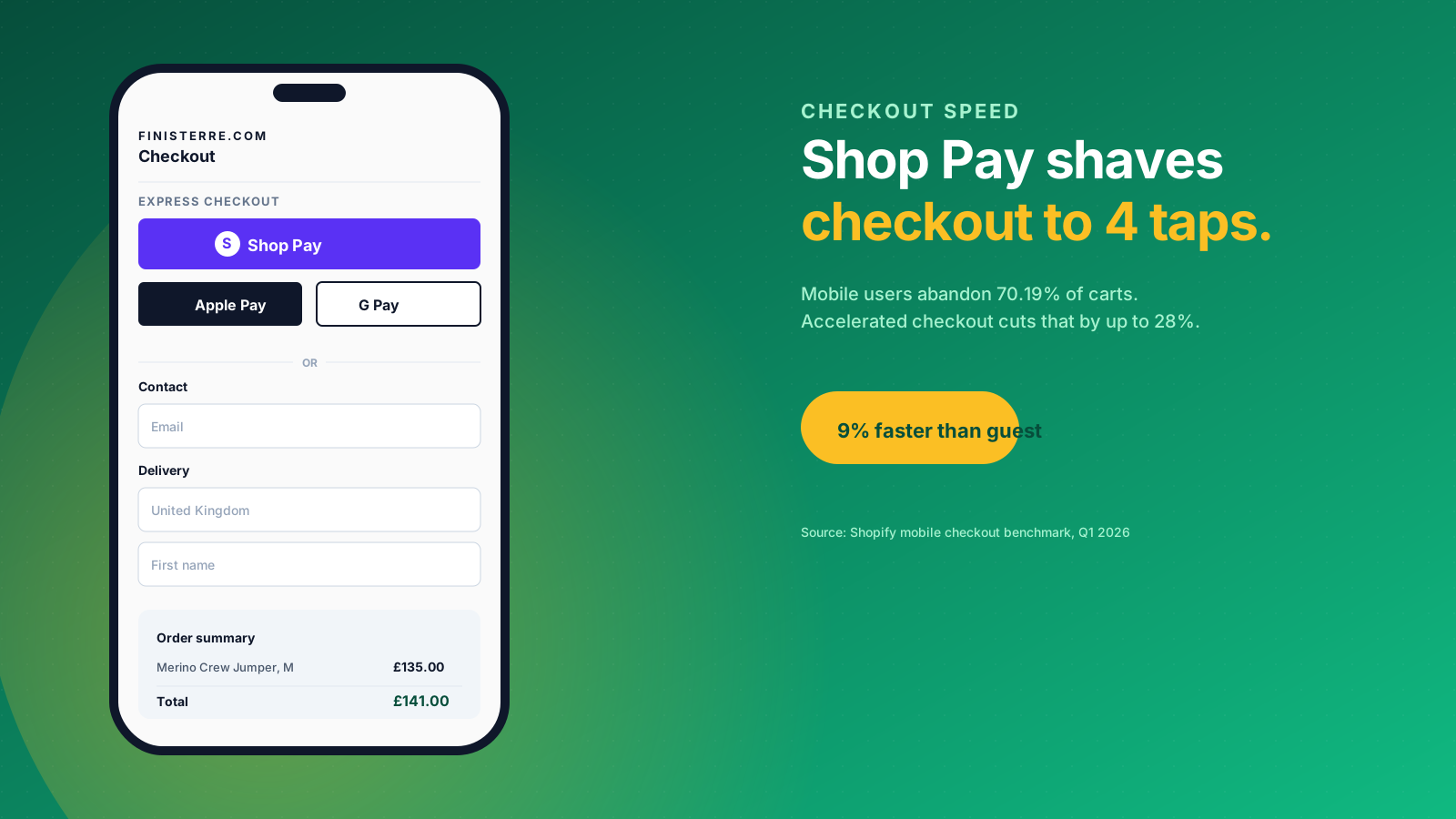
Mobile checkout is the part of mobile SEO most "mobile SEO" articles ignore, and that's a mistake. Google doesn't rank your checkout page directly, but mobile shoppers abandon slow or fiddly checkouts at a punishing rate (around 70% on mobile in 2025 vs 60% on desktop), and those abandoned sessions feed back into the engagement signals that do affect rankings.
For a Shopify store, the most useful mobile checkout lever is the accelerated checkout button. Shop Pay, Apple Pay, Google Pay and PayPal all reduce checkout to a handful of taps on a mobile device:
- Shop Pay is Shopify's own one-tap checkout. According to Shopify's published 2025 data, Shop Pay converts mobile users 9% faster than guest checkout and lifts overall conversion rate by up to 50% on returning buyers.
- Apple Pay works for the 56% of UK smartphone users on iOS, and integrates with Face ID for true one-tap authentication.
- Google Pay covers Android users and works the same way: card details are tokenised, billing address is pre-filled, the user authenticates with a fingerprint.
Turn on every accelerated checkout that applies to your customers and place the buttons above the standard form on the checkout page. This is a one-line setting in Shopify Payments. The customers who want one-tap checkout get it; the customers who want to type their email and address still can.
The second mobile checkout lever is field count. Every additional checkout field reduces mobile conversion by roughly 1 to 2%. Audit your fields ruthlessly: do you really need a phone number? Do you need both billing and shipping address by default? Can you ask for marketing consent post-purchase rather than mid-checkout? For brands on Shopify Plus, the Checkout Extensions framework lets you customise this layer; for everyone else, the standard Shopify checkout is already well-optimised for mobile, and most "improvements" make it worse.
Product Schema for Mobile Rich Results
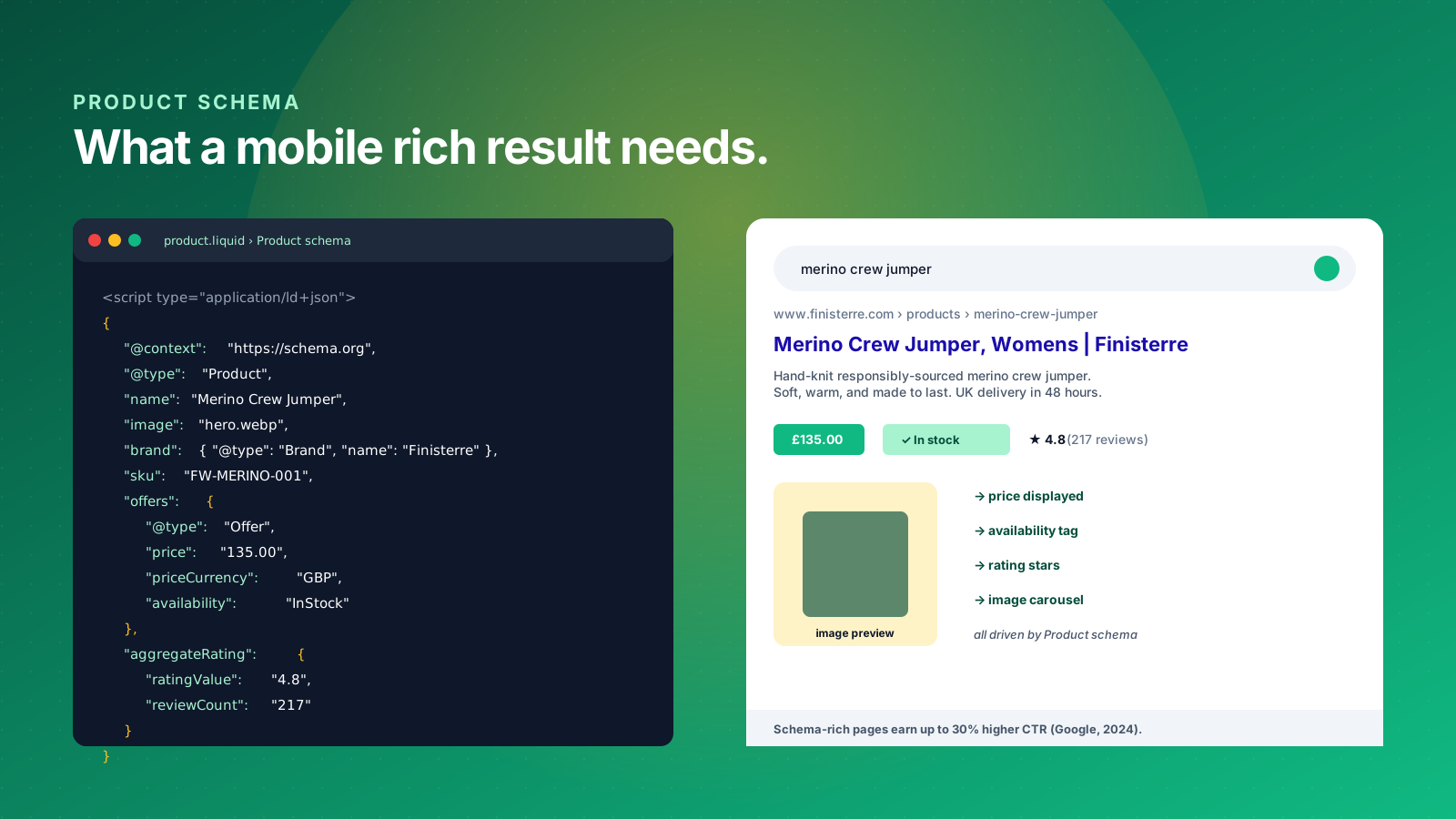
Schema markup is the single biggest lever for earning visibility in mobile search results, and it's the area most Shopify brands leave money on the table. Mobile SERPs heavily favour rich results: price, rating, availability, and image carousels all dominate the screen in a way they never could on desktop. Product schema is what makes those rich results possible.
The minimum product schema for an ecommerce page should include:
- Product: name, image, brand, SKU, description
- Offer: price, priceCurrency, availability (InStock, OutOfStock, PreOrder)
- AggregateRating: ratingValue, reviewCount (only include this if you genuinely have review data; faking it is a manual action risk)
- Review: individual review markup for the most recent or most helpful reviews
Shopify's default themes ship with a basic Product schema block in product.liquid, but it's almost always incomplete and rarely includes AggregateRating. Adding the missing properties is one of the highest-leverage things you can do for mobile SEO. Websites using proper ecommerce schema markup see up to 30% higher click-through rates compared to those without structured data, according to Google's own published guidance.
Beyond Product, layer in BreadcrumbList schema on collection and product pages so mobile search results show the category path. Add FAQPage schema on pages with FAQ sections (like this one), and HowTo schema on guide-style content. Each one earns you an additional visual cue in the mobile SERP: rich snippets, image carousels, FAQ accordions and price tags that push competitors below the fold and lift e-commerce click-throughs across phrases and product titles.
Use Google's Rich Results Test to validate every schema block before you push it live. Errors break the whole rich result, and Google won't tell you they're broken unless you check. Our complete guide to adding schema markup for ecommerce covers the implementation in detail.
Local Mobile SEO for Stores with a Physical Presence
If your store has a physical location, a showroom, or a pop-up presence, local mobile SEO compounds with the rest of your strategy. Mobile is where "near me" searches happen (over 80% of "near me" queries come from a phone, according to Google's own data), and the local pack on mobile takes up most of the screen on the first scroll.
The local mobile SEO foundations every store with a physical address should cover:
- Google Business Profile (formerly Google My Business) claimed, verified and complete. Add your full address, phone number, opening hours, product range, photos, links, and a link to the relevant page on your Shopify store.
- Local schema markup with LocalBusiness or Store types on the location page of your site, including geo coordinates, opening hours and accepted payment methods.
- NAP consistency across the web: your name, address and phone number should be identical on your site, your Google Business Profile, your social channels and any third-party directories. Backlinks from local listings reinforce the same signal.
- Local reviews on Google. Aim for a flow of reviews rather than a burst; Google reads recency as a freshness signal, and review velocity is one of the strongest local mobile SEO factors.
For omnichannel Shopify businesses, the combination of online and local mobile SEO can be transformational. UK retail clients consistently win 30 to 40% of their organic mobile traffic from local pack visibility once the Google Business Profile is properly set up and linked back to product pages on the Shopify store. Case studies of our local omnichannel work routinely show double-digit lifts in mobile rankings within a single quarter.
Common Mobile SEO Mistakes Ecommerce Brands Make
After auditing dozens of Shopify stores a year, the same handful of mobile SEO mistakes show up again and again. These are the ones to check first on your own store.
Hiding content on mobile to "clean up the design". If your product description has a "read more" toggle on mobile that hides 80% of the text, Google still indexes that text, but only what's visible counts for engagement signals. Either show the content by default or split it into properly structured tabs and sections.
Letting popups cover the main content. A Klaviyo email signup popup that triggers in the first 3 seconds and covers the product image is an intrusive interstitial as Google defines it. Delay popups by 15 seconds, scroll depth, or exit intent. Better still, use embedded forms instead.
Slow hero images on the homepage. Most Shopify homepages have a hero banner that's the LCP element on mobile. If it's a 1.5MB JPEG, you're failing LCP before the rest of the page even has a chance. Convert hero images to WebP, set explicit dimensions, and serve a smaller version on mobile via the srcset attribute.
Over-stacking apps. Every Shopify app adds JavaScript, and most of that JavaScript runs on every page. We've audited stores with 30+ active apps where the mobile LCP was over 5 seconds. The fix is uncomfortable but effective: uninstall every app you can't justify with revenue, and consolidate the rest where you can.
Ignoring INP. INP became a Core Web Vital in March 2024, but many stores still don't measure it. If you're optimising for FID (the metric INP replaced), you're optimising for last year's signal. Use the Web Vitals Chrome extension or PageSpeed Insights to check your live INP, and audit any page where it exceeds 200ms.
Skipping AggregateRating schema. If you have reviews on your product pages, they should be in the schema. Without AggregateRating, your mobile SERP listing shows no stars; your competitor with proper schema has them. That visual difference is worth a measurable CTR uplift across mobile search rankings.
Treating AMP as the answer. AMP was Google's mobile speed framework, and it's no longer required for the Top Stories carousel or any other mobile feature. Don't add AMP to a Shopify store in 2026; fix your underlying Core Web Vitals with proper mobile optimization instead.
How to Audit Your Mobile SEO (The Tools and Process)
A mobile SEO audit for an ecommerce store should take a working day. Here's the process we run on every new Charle engagement, with the tools we use at each step.
Step 1: Render check via Google Search Console. Use the URL Inspection tool on your homepage, your top three collections, and your top three product pages. For each, view the mobile-rendered HTML and confirm the full product description, reviews and FAQ blocks are present in the source.
Step 2: Core Web Vitals via PageSpeed Insights and CrUX. Test your top 10 mobile landing pages individually. PageSpeed Insights gives you the lab data and the recommendations; the Chrome User Experience Report (CrUX) gives you the real-world field data over the last 28 days. Anything failing on field data is the priority.
Step 3: Mobile usability via the Page Experience report. Inside Google Search Console, the Page Experience report shows mobile usability issues across your whole site. Tap target spacing, viewport width, font sizing: all flagged URLs go on the fix list.
Step 4: Schema validation via the Rich Results Test. Run every page template through it: home, collection, product, blog post, FAQ. Errors in any schema block break the whole rich result, so fix every error before adding new schema types.
Step 5: App stack audit. Open your Shopify admin, list every installed app, and rank them by JavaScript impact. Use the Web Vitals Chrome extension to compare INP and LCP with versus without each app enabled.
Step 6: Mobile SERP analysis. Search your top 10 ranking keywords on a real phone (not the desktop SERP simulator), and screenshot what you see. How many AI Overviews, image carousels, shopping packs, local packs and rich results are above your listing? That's the gap you need to close.
For ongoing monitoring, set up rank tracking that explicitly captures mobile positions (most rank trackers default to desktop), and put Core Web Vitals in your monthly reporting cadence. A site that's a green pass today can drift to amber in a quarter as new apps, new content and seasonal updates land. Quality testing across browsers and devices, and ongoing audits of your top SEO tips and best practices, keep mobile SEO success compounding rather than decaying.
When to Bring in a Mobile SEO Agency
Most Shopify businesses can handle the foundational mobile SEO work in-house. Setting up Google Business Profile, fixing intrusive popups, adding AggregateRating schema, and switching hero images to WebP are all jobs an in-house team can own with a clear checklist. Foundational mobile rankings work doesn't require an agency; it requires discipline.
You bring in a specialist mobile SEO agency when the work crosses one of three lines, and the cost of getting it wrong starts to outweigh the cost of expert specialists.
Technical depth beyond the in-house team. Hitting INP under 200ms on a Shopify Plus store with 15+ apps requires JavaScript profiling, app-load deferral, and sometimes a theme-level refactor. This is specialist work, and the wrong intervention can make things worse. The right agency brings the SEO expertise and the technical experience to get it right first time, which is exactly where most in-house teams struggle.
Schema and AI search integration. Google's AI Overviews favour pages with rich, well-structured product data, and getting AggregateRating, Review, FAQPage and HowTo schema right across thousands of product pages is a templating problem, not a content one. An agency that understands both Shopify Liquid and the schema.org vocabulary will get there faster, and the resulting visibility lifts mobile rankings, qualified clients, and ultimately conversions.
Tied to a wider SEO programme. Mobile SEO doesn't sit on its own. It connects to keyword strategy, content production, internal linking, web design, SEO strategies across platforms, and a clear measurement framework. The role of an agency here is to align SEO best practices with the load times, layouts and on-page elements that drive mobile rankings. If the rest of your SEO programme already lives with an agency, mobile SEO usually belongs there too, because the same growth signals that drive desktop rankings drive mobile rankings.
At Charle, mobile SEO is a built-in part of every Shopify Plus engagement, because we work on stores where the cost of mobile underperformance is measured in tens of thousands a month, not single digits. Our specialist SEO experts bring the technical expertise to lift mobile rankings and the commercial growth orientation to translate that into conversions and new clients for our businesses. Charle's case studies and success stories across UK Shopify Plus brands show consistent improvements in mobile rankings, organic conversions, and revenue growth.
If you'd like a structured audit of your store's mobile SEO, our ecommerce SEO services and SEO agency team can help. Get in touch to discuss how we can improve your mobile organic visibility and turn mobile rankings into conversions.