 Nic Dunn, CEO, Charle Agency
What Is a Shopify Chargeback?
A Shopify chargeback is a forced payment reversal. The cardholder disputes the charge with their bank, the bank takes the disputed amount and a chargeback fee out of your next Shopify Payments payout, and you get a short window to submit evidence. The bank rules, not Shopify.
Around 80% of disputes are friendly fraud, where the cardholder made the purchase and disputes it anyway, and roughly 71% of digital commerce losses sit in that first-party category rather than criminal fraud. Shopify puts total chargeback costs at about 0.47% of merchant revenue.
Three things get confused, and the difference decides how much money moves and when.
- A refund is money you return voluntarily. It costs the sale and never touches your dispute rate.
- An inquiry is the bank asking questions first. Per Shopify's documentation, it takes neither the disputed amount nor the fee up front. Resolve it and no chargeback is recorded.
- A chargeback takes both immediately, counts against your dispute rate with Visa and Mastercard, and puts your Shopify Payments account at risk.
One trap catches merchants repeatedly: once a chargeback is filed, refunding the customer will not cancel it, so you lose the refund and the disputed amount.
This guide covers Shopify Payments, Shopify's own payment processor. A chargeback raised on a third-party gateway such as PayPal or Stripe follows that provider's dispute process instead, though the credit card company and issuing banks behind it work the same way.
How the Chargeback Process Works on Shopify
Every dispute follows the same seven steps. Missing step four forfeits the case with no appeal.
- The cardholder disputes the charge. Their bank issues a provisional credit and decides between a chargeback and an inquiry.
- Funds leave your balance. The disputed amount and the fee are deducted before you have said anything.
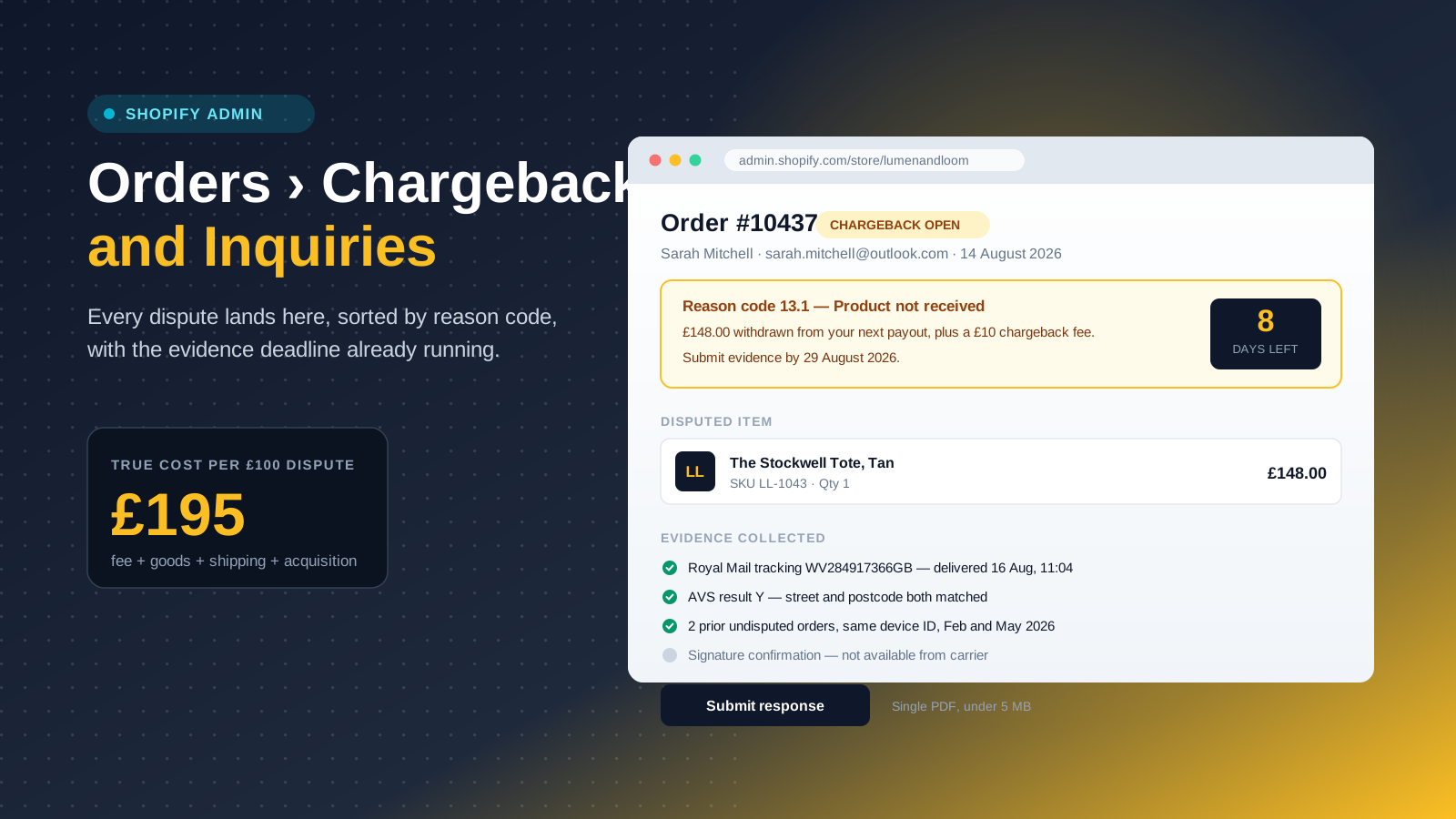
- Shopify sends a chargeback notification by email and in the admin under Orders, then Chargebacks and Inquiries, listed by reason code with the deadline showing.
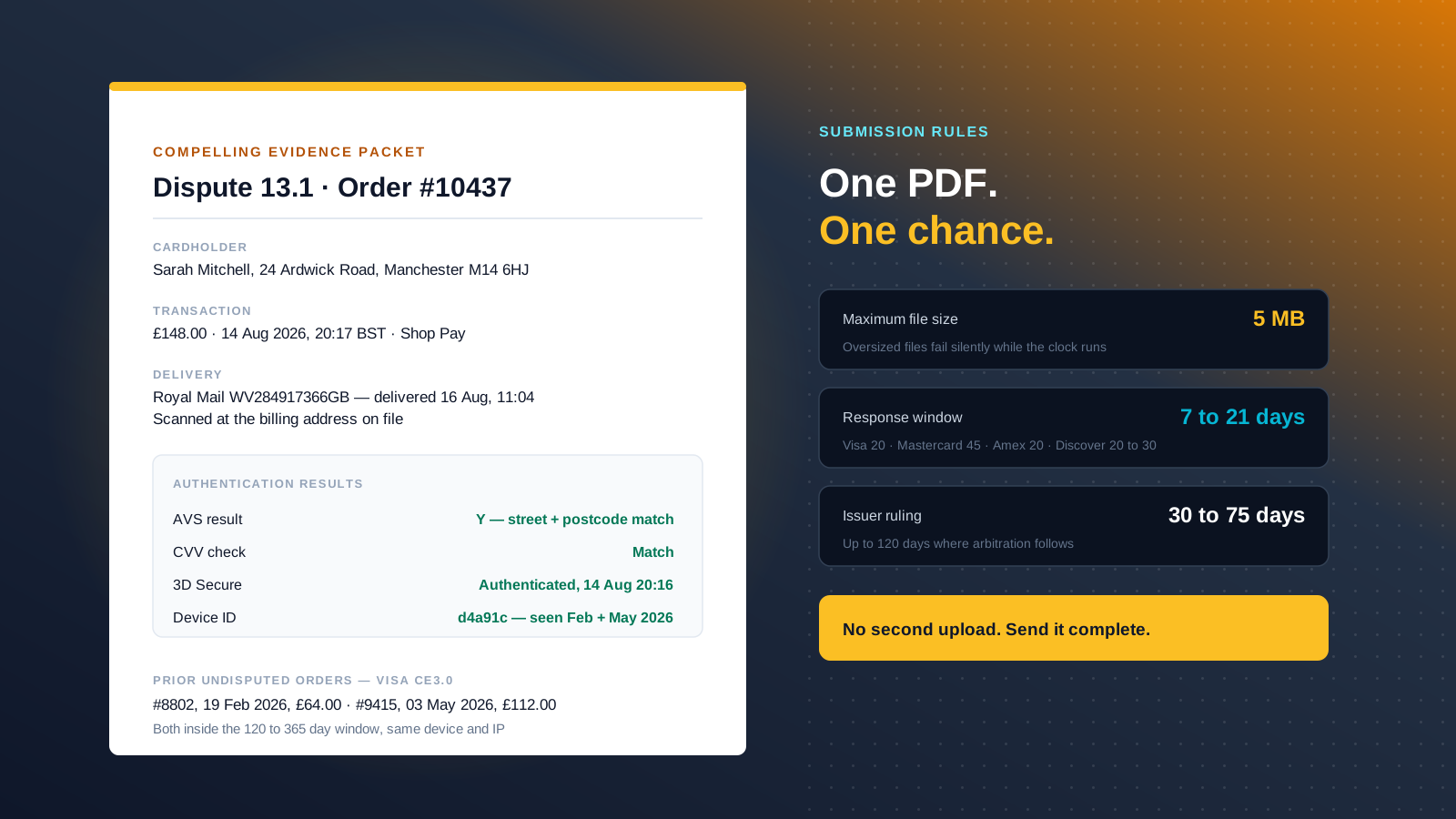
- Your response window opens. Typically 7 to 21 days, depending on the card network. Visa allows 20 days, Mastercard up to 45, American Express 20, Discover 20 to 30. Whichever clock runs out first is your real deadline.
- Shopify submits your evidence as a single packaged PDF. You never contact the issuing bank directly.
- The issuer rules, usually 30 to 75 days later and occasionally up to 120. A win returns the order value and, in most regions, the fee.
- Arbitration is the only escalation, and Visa charges around £370 to run it.
Shopify facilitates the submission and nothing more. It cannot argue your case or overturn an outcome. For product not received disputes it now attaches AI-generated insights from your account data, which you can opt out of on the evidence form.
Shopify Chargeback Reason Codes Explained
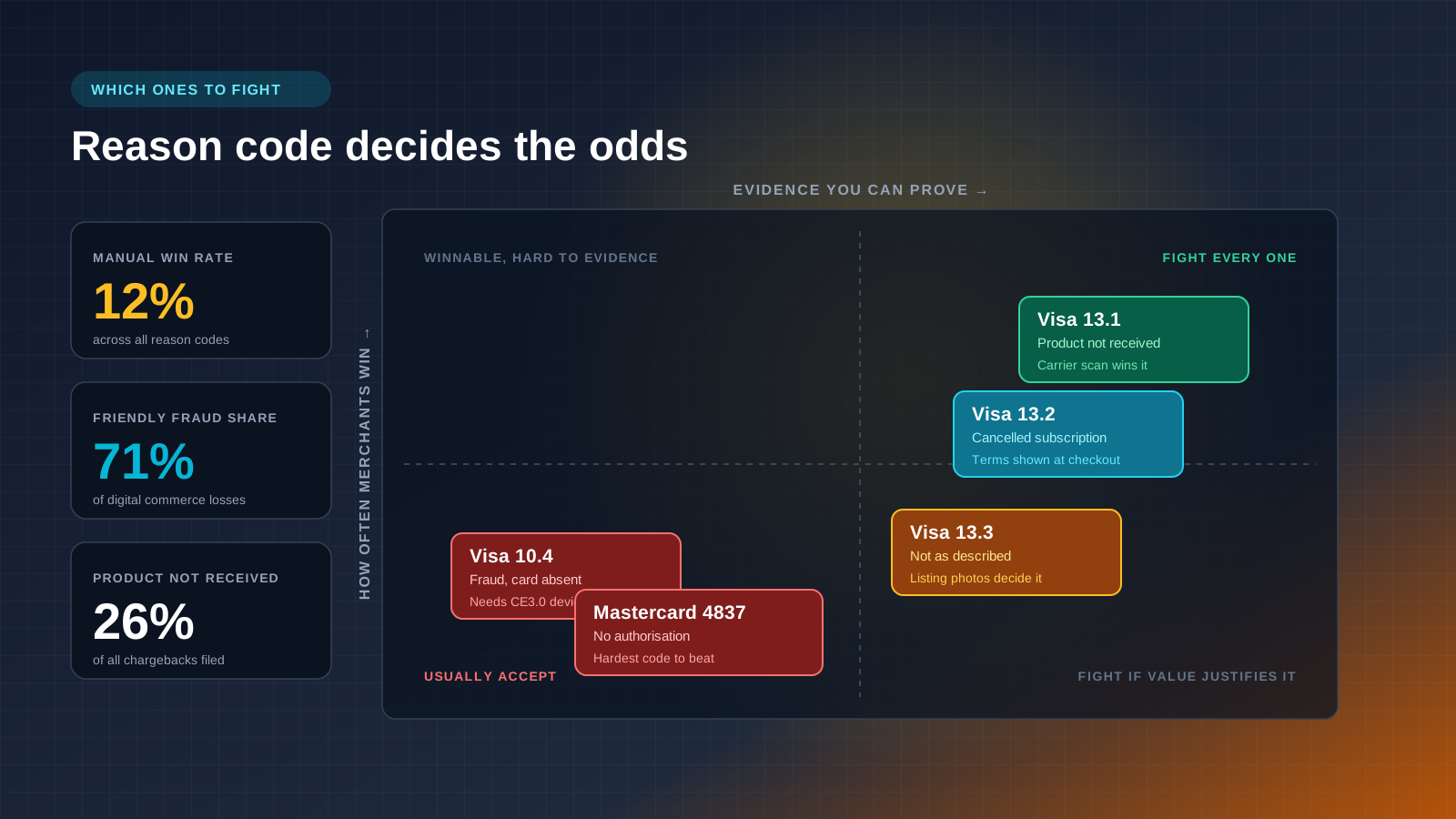
Every dispute arrives with a reason code assigned by the card network, and that code decides what evidence the bank will read. Answering the wrong question is the most common reason merchants lose winnable cases. The reasons customers give fall into eight Shopify categories, each mapping to network codes underneath.
| Shopify category | Network code | What the cardholder claims | Odds |
|---|---|---|---|
| Fraudulent | Visa 10.4 | They did not authorise the purchase | Hard without device data |
| Fraudulent | Mastercard 4837 | No cardholder authorisation | Hardest to beat |
| Product not received | Visa 13.1 / MC C08 | The order never arrived | Winnable with carrier proof |
| Subscription cancelled | Visa 13.2 | Billed after cancelling | Winnable with clear terms |
| Product unacceptable | Visa 13.3 | Not as described or damaged | Moderate |
| Unrecognised | Various | They do not recognise the descriptor | Preventable |
| Duplicate | Various | Charged twice for one order | Easy |
| Credit not processed | Various | Refund promised, never arrived | Records decide it |
Volume clusters at the top. Product not received accounts for over 26% of all chargebacks, wrong items shipped drive roughly 15%, and another 8% come from purchases that did not match the product page.
What a Shopify Chargeback Actually Costs
Shopify Payments charges a fee on every dispute, taken when the chargeback is filed rather than decided. Chargeback fees vary by country: £10 in the United Kingdom, $15 in the United States, €15 plus VAT across most of the EU, $15 CAD in Canada, $25 AUD in Australia and $20 NZD in New Zealand. Several regions refund the fee if you win, which is unusual. Most platforms keep chargeback fees regardless of outcome.
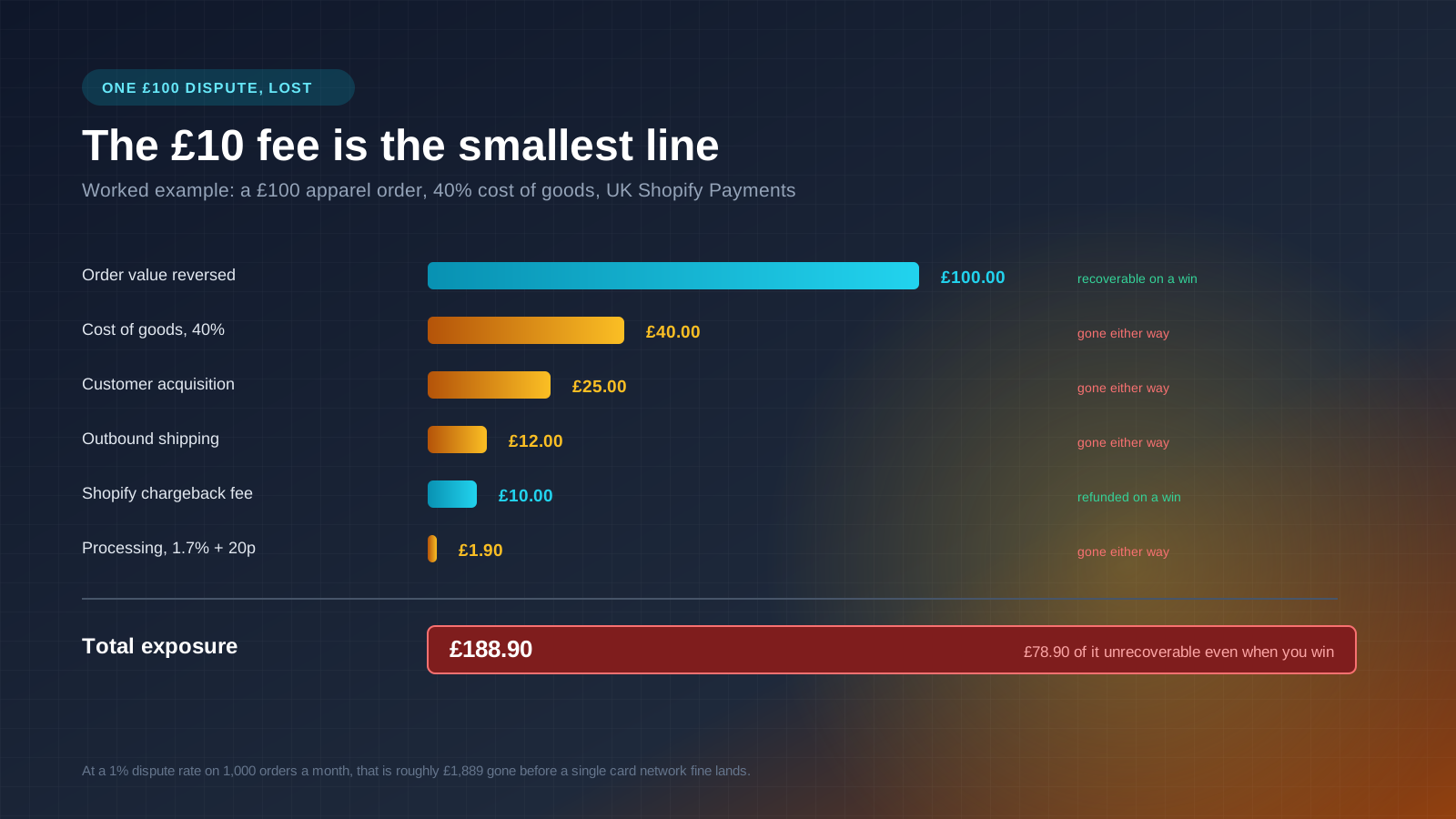
The fee is the smallest line in the bill. Take a £100 apparel order at 40% cost of goods. You lose the £100 order value, £40 of stock that is almost never returned, roughly £12 of outbound shipping, about £25 of acquisition cost, £1.90 of non-refundable processing, and the £10 fee. That is close to £189 of exposure, and around £79 stays gone even when you win. Industry research on chargeback costs lands in the same place, at roughly £3 to £4 for every £1 disputed.
A store taking 1,000 orders a month at a 1% dispute rate is losing near £1,900 monthly before a single card network fine appears, and the impact on margin compounds from there. Our guide to Shopify Payments covers the wider processing picture.
The 2026 Monitoring Thresholds That Put Your Account at Risk
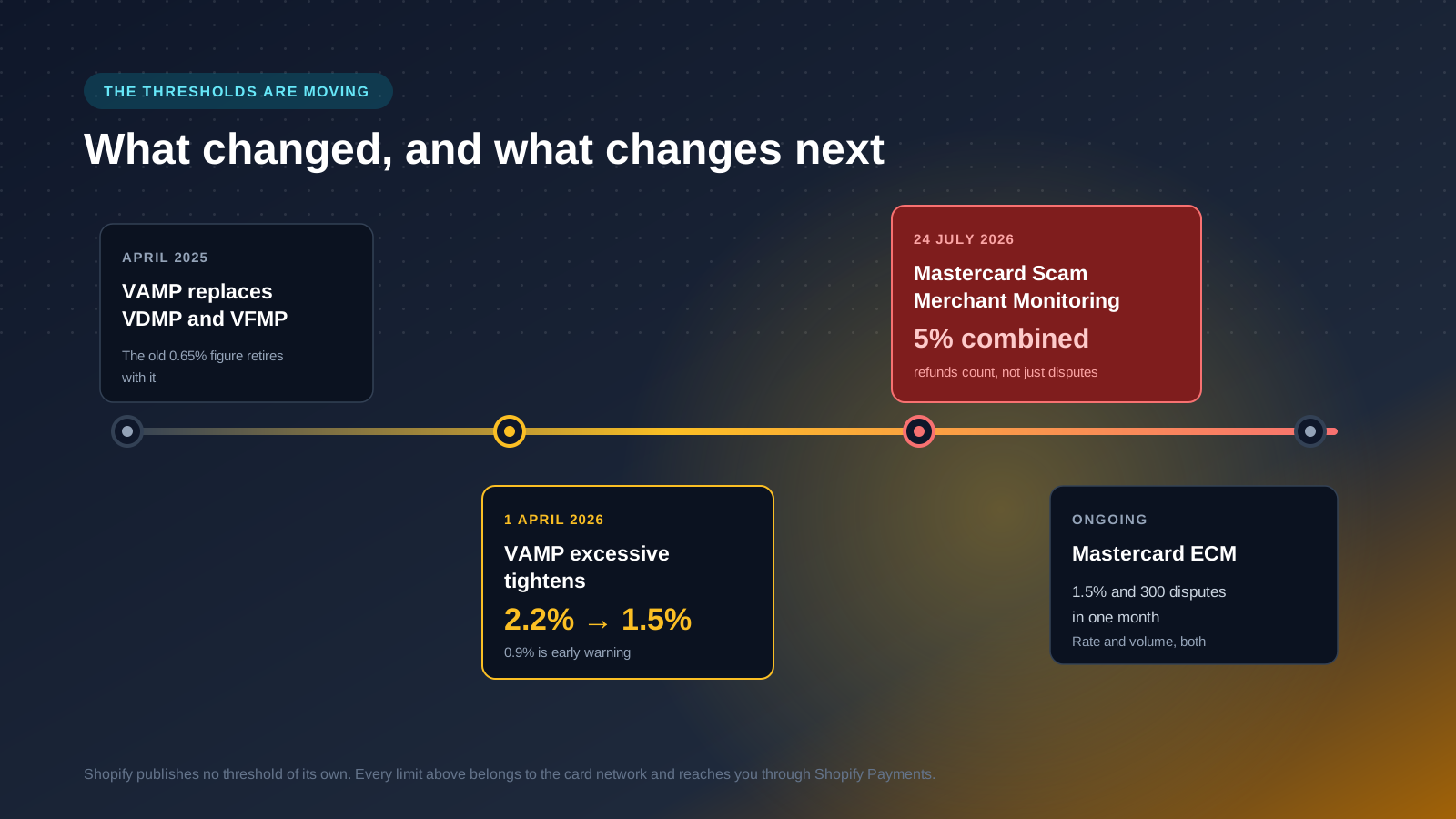
Shopify publishes no chargeback rate limit of its own. The card networks set the ceilings and enforce them through Shopify's acquirer relationship. This is the part of chargeback management that has changed most, and plenty of guides still quote retired numbers. Visa replaced the old Visa Dispute Monitoring Program and Visa Fraud Monitoring Program with the Visa Acquirer Monitoring Program (VAMP) in April 2025, and the widely repeated 0.65% figure belonged to the retired VDMP.
| Programme | Network | Early warning | Excessive |
|---|---|---|---|
| VAMP | Visa | 0.9% of transactions | 2.2% to 31 March 2026, then 1.5% from 1 April 2026 |
| Excessive Chargeback Merchant | Mastercard | 1.0% and 100 disputes | 1.5% and 300 disputes in a month |
| Scam Merchant Monitoring | Mastercard | 3% combined refunds and disputes | 5% combined, minimum 500 transactions |
Two details matter. Mastercard's Excessive Chargeback programme needs both the rate and the volume breached, so a small store with a high percentage is usually safe where a large one is not. And Mastercard's Scam Merchant Monitoring, live from 24 July 2026, counts ordinary refunds alongside chargebacks. Fashion businesses running normal 20% to 30% return rates need to watch that combined number closely.
Under the Mastercard programme, acquirers including Shopify Payments have 72 hours to complete an investigation and verify legitimate trading, or face processing blocks. Cross a line on any of these and you face escalating monthly fines, closer review of every dispute, and eventually suspension of your account.
How to Respond to a Shopify Chargeback
You can accept a dispute or fight it. If the complaint is fair, accepting and fixing the process behind it is the better trade. If not:
- Contact the customer first. Many disputes come from confusion rather than intent, and a cardholder who agrees the charge was legitimate can ask their bank to withdraw it. Keep that communication, because it becomes evidence if the issue is not resolved.
- Build one complete package. Shopify accepts PDF, JPEG and PNG only. PDFs must be PDF/A compliant, under 50 pages and 2 MB each, capped at 5 MB combined. An oversized file fails quietly while the deadline runs.
- Submit once. Shopify forwards everything on the deadline as a single response, so a second upload cannot be added.
Evidence That Wins, by Reason Code
Generic proof of sale rarely wins chargeback disputes. The bank only reads evidence answering the question the code asks.
| Reason code | The question the issuer is asking | What to submit |
|---|---|---|
| Visa 10.4 / MC 4837, fraud | Did the real cardholder authorise this? | AVS and CVV results, 3D Secure logs, device ID and IP captured at checkout, billing information, prior undisputed orders, and proof of any family member who used the card |
| Visa 13.1, not received | Did the goods arrive? | Carrier tracking information with a delivered status and timestamp, signature confirmation, proof the delivery address matched the billing address |
| Visa 13.2, cancelled subscription | Did they actually cancel? | Subscription terms as accepted, your cancellation policy, renewal reminder emails, activity logs showing continued use |
| Visa 13.3, not as described | Was the item as listed? | The product listing as it appeared at the time of sale, product photography, your return policy, the customer service exchange |
| Credit not processed | Was a refund owed and issued? | Refund transaction ID, your return policy as agreed at checkout, evidence the customer did not follow the returns process |
Visa's Compelling Evidence 3.0 changed the fraud picture. Under CE3.0, expanded in April 2026, you can overturn a friendly fraud claim with two previous undisputed transactions from the same IP address or device ID, dated 120 to 365 days before the dispute. Stores that do not retain device IDs across a rolling year have no answer to a 10.4, which is why fraud codes look unwinnable to so many merchants.
Two results from AVS, the Address Verification Service, matter more than the rest. Visa's guidelines treat only a match code of Y, street and postcode matched, or M, postcode matched, as compelling evidence. Anything else is a reason to pause fulfilment and verify the order. Card verification code checks and 3D Secure records belong in the same packet, because together they establish that the real cardholder authorised the purchase.
Preventing Chargebacks on Shopify
A dispute never filed costs nothing to win. Ranked by return:
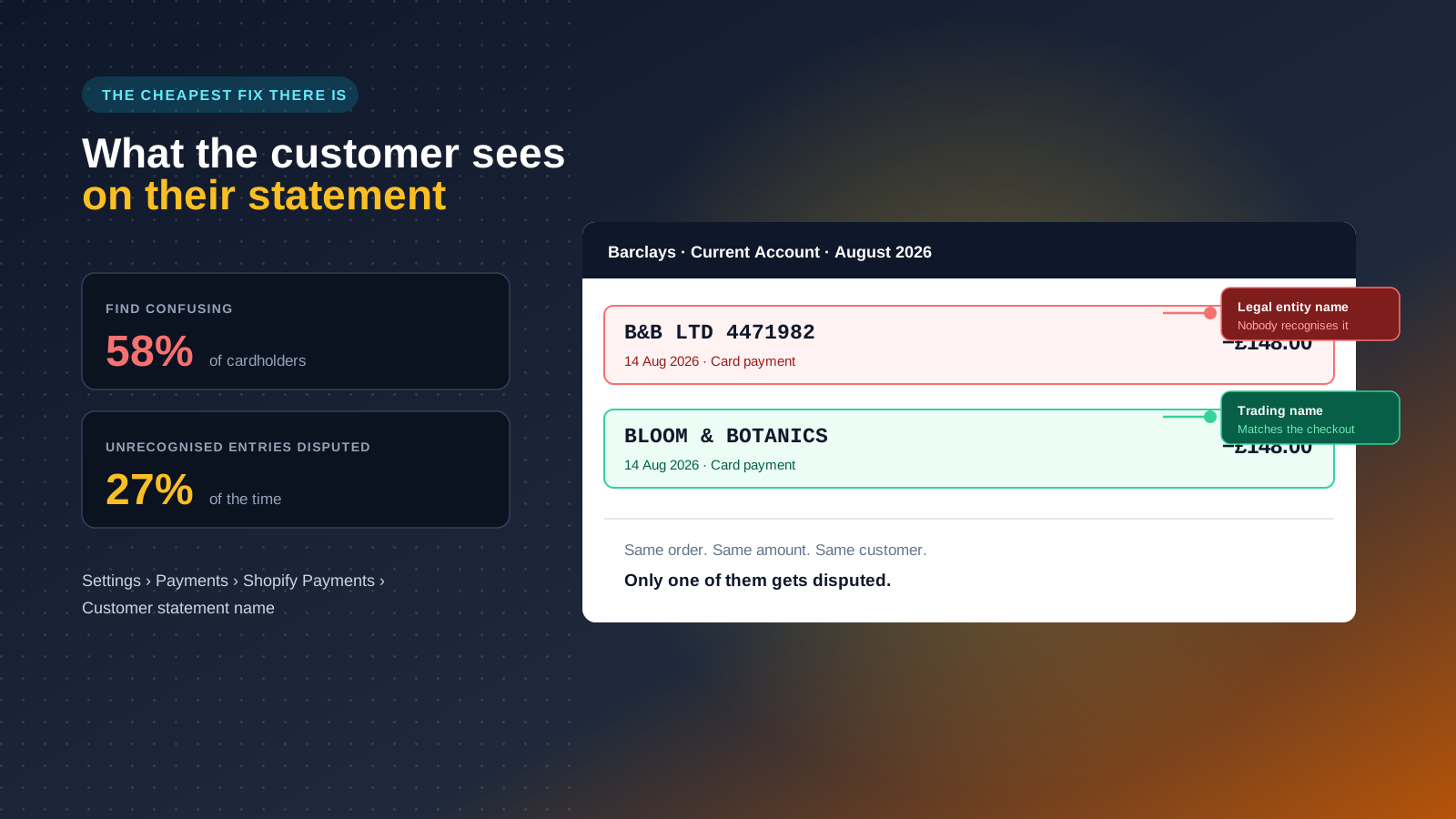
- Fix the billing descriptor. More than 58% of cardholders say statement descriptions confuse them, and unrecognised entries trigger disputes about 27% of the time. Set the customer statement name in Shopify Payments to the brand, not the legal entity.
- Send tracking notifications and itemised digital receipts at every stage. Shopify Flow can fire them at label creation, carrier collection, out for delivery and delivery confirmation. Customers who can see their order and recognise the receipt do not phone their bank.
- Refund fast when the complaint is fair. Shopify advises refunding within two hours to stop a Visa fraud warning attaching to the transaction.
- Describe your products accurately and photograph them honestly. Overselling copy invites product unacceptable disputes from customers whose expectations the products never met. See our guide to optimising product descriptions.
- Put your refund policy and return policies at the checkout confirmation step, not the footer, and make cancellation self-serve.
- Screen and hold risky orders. Shopify fraud analysis flags mismatched billing and shipping addresses, distant IP locations, multiple credit cards tried and freight-forwarder postcodes. Dedicated fraud apps add a further screening layer. On high-value orders, 3D Secure shifts liability to the issuing bank.
Protection Tools and Pre-Dispute Alerts
Shopify Protect is free and automatic on eligible Shop Pay orders, reimbursing the order value and the fee with no evidence submission. Eligibility is narrow: physical goods, approved carriers, defined fulfilment windows, US-based merchants. Fraud Protect is a separate paid per-transaction add-on for qualifying US merchants, switched on at product or collection level. Neither covers product not received or not as described claims.
Pre-dispute alerts are the tool most UK stores are missing. Ethoca handles Mastercard, Verifi handles Visa through Rapid Dispute Resolution and CDRN. Both flag a dispute before it hardens into a chargeback, giving you a window to refund. A refunded alert never carries the fee and never touches your dispute rate. Shopify also runs a Network Dispute Resolution Program that some merchants are auto-enrolled into after a risk review, resolving eligible disputes for a per-dispute fee with no evidence window.
| Tool | Best for | Pricing model | Category |
|---|---|---|---|
| Shopify Protect | Shop Pay physical goods | Free | Prevention and recovery |
| Chargeflow | High dispute volume brands | Percentage of recovered funds | Recovery |
| Signifyd | High-AOV categories | Per transaction, guaranteed | Prevention |
| NoFraud | Pass or fail order decisions | Per transaction | Prevention |
| Disputifier | Small to mid-size teams | Flat monthly | Recovery |
Automated representment apps report win rates well above the roughly 12% merchants achieve fighting chargebacks by hand. Several are listed in the Shopify App Store.
Why We Tell Most Stores to Stop Fighting Chargebacks
The default advice is to fight every chargeback. We think that is wrong for most Shopify stores, and the arithmetic is not close.
Assembling a proper evidence packet takes a competent operations person the better part of an hour: pulling tracking, exporting device and AVS data, checking the listing as it appeared, building the PDF. Manual representment wins roughly 12% of the time. On a £75 order that is about £9 of expected recovery for an hour of work, and the hour is worth more in almost every business we work with.
So we set a floor. Below roughly £75, accept the chargeback and move on, unless the code is 13.1 with a clean carrier scan, which is close to a free win. Above it, fight properly and match the evidence to the code. Spend the hours that frees up on the descriptor, the tracking notifications and the cancellation flow, because those remove disputes permanently rather than recovering them one at a time.
The one thing we would not compromise on is device ID capture. It costs nothing to retain, and without a rolling 365 days of it you cannot use CE3.0, which leaves the largest category of disputes unwinnable. Set that up before buying any chargeback tooling. For more, browse our full collection of Shopify guides.